Brixus
  1. Courses
  2. Certification Study Guides
  3. AZ-104 Azure Administrator Book: Study Guide & Exam Questions
  4. Read
AZ-104 Azure Administrator Book: Study Guide & Exam Questions
  • 1.Part 1: Azure Administrator Prerequisites
    • 1. Azure Cloud Shell, PowerShell and CLI
    • 2. ARM Templates and Infrastructure as Code
  • 2.Part 2: Identity, Access and Governance
  • 3.Part 3: Azure Virtual Networking
  • 4.Part 4: Azure Storage Implementation
  • 5.Part 5: Azure Compute Resources
  • 6.Part 6: Backup, Recovery and Monitoring

Your progress is not saved. You are trying this lesson as a guest, so your answers and progress are not saved.

1.1 Azure Cloud Shell, PowerShell and CLI

Managing Azure from the command line usually means installing the Azure CLI or Azure PowerShell on your own computer. Azure Cloud Shell removes that dependency by giving you an authenticated Bash or PowerShell prompt that runs in the browser and acts with your account permissions.

That matters when your usual workstation is out of reach — for example, an on-call administrator who only has a borrowed laptop or a phone can still restart virtual machines, inspect storage, and adjust networking without installing anything.

What a browser-based shell provides

Microsoft operates Cloud Shell as a managed service, so every new session already contains the newest CLI and PowerShell modules. You simply sign in through the browser and work with the same resources your identity can already access, on infrastructure that applies double encryption at rest by default without extra configuration.

  • Manage virtual machines, storage, and networking with the same commands used locally through Azure CLI or PowerShell

  • Always start with current tools, with no manual module updates to track

  • Work under your own permissions from any device that has a browser

  • Keep SSH keys, scripts, and other files in cloud storage that is reachable across sessions and devices

  • Revise scripts in a built-in editor that saves directly to that cloud storage

1. An administrator has only a borrowed tablet with a web browser and no Azure software installed. The administrator needs to restart an Azure virtual machine and check an Azure storage account using that tablet. Why is Azure Cloud Shell able to handle this task?
  • It provides a browser-based authenticated Bash or PowerShell session with current Azure tools that acts with the user's permissions, so no local installation is needed.
  • It permanently installs the Azure CLI, PowerShell modules, and virtual machines onto any device that opens the browser.
  • It grants every browser user full administrator rights to all Azure subscriptions without signing in.
  • It downloads Azure virtual machines and storage accounts to the tablet for offline editing.
Show answer and explanation
  • It provides a browser-based authenticated Bash or PowerShell session with current Azure tools that acts with the user's permissions, so no local installation is needed.

Cloud Shell provides an authenticated Bash or PowerShell session in the browser that uses the user's permissions and preinstalled Azure tools, so nothing needs to be installed on the borrowed device.

2. In Azure Cloud Shell, Microsoft automatically provides the newest Azure CLI and PowerShell modules, so users do not need to manually update those tools before managing resources.
  • True
  • False
Show answer and explanation
  • True

Cloud Shell is a managed service that starts each session with current versions available immediately after sign-in.

3. Azure Cloud Shell is an authenticated shell that does not run on the local device, and protection of data at rest in its infrastructure uses ____ by default.
  • double encryption
  • local-only storage
  • single sign-on
Show answer
  • Azure Cloud Shell is an authenticated shell that does not run on the local device, and protection of data at rest in its infrastructure uses double encryption by default.

Opening a session and how the temporary host behaves

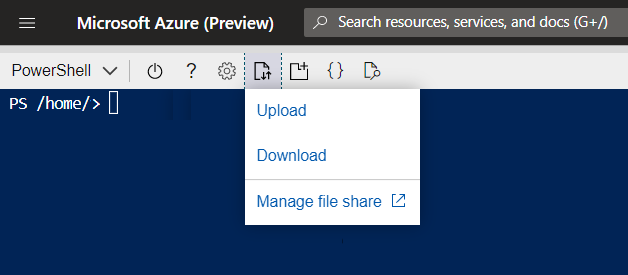
You can reach the shell from https://shell.azure.com, from the Cloud Shell button in the Azure portal, or from Try It code blocks in Microsoft Learn tutorials.

Cloud Shell button in the Azure portal header

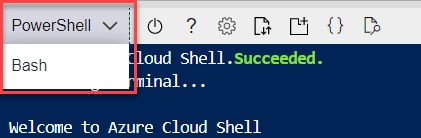
Opening Cloud Shell allocates a short-lived host that is already configured with the latest Bash and PowerShell. You pick the experience you prefer and immediately run commands against your subscriptions.

Choosing between Bash and PowerShell for a new Cloud Shell session

The host is temporary. After 20 minutes without activity the session ends and its in-memory state is gone, while anything written to CloudDrive stays saved and reappears after you start a fresh session.

Diagram: Temporary host — discarded after 20 min idle, Cloud Shell host: Bash or PowerShell, Azure resources, Virtual machines, Storage, Networking, Persistent storage — survives, CloudDrive, Azure File Share, Browser with no local tools

A junior administrator for a regional food-delivery startup is traveling without the usual admin workstation when an Azure virtual machine running the ordering API stops responding. The only available computer is a relative's Chromebook with a web browser, but the administrator's diagnostic scripts are saved in persistent Cloud Shell storage.

4. Arrange the steps the traveling administrator should follow to diagnose the unresponsive Azure virtual machine with Cloud Shell, from first to last.
  • Open Cloud Shell so a temporary host preconfigured with Bash and PowerShell is allocated
  • Retrieve diagnostic scripts from CloudDrive or the mapped Azure File Share
  • Run diagnostic and repair commands against the virtual machine
  • Select the preferred shell experience, Bash or PowerShell
  • Sign in through the Azure portal or https://shell.azure.com with the organization's account
Show answer
  1. Sign in through the Azure portal or https://shell.azure.com with the organization's account
  2. Open Cloud Shell so a temporary host preconfigured with Bash and PowerShell is allocated
  3. Select the preferred shell experience, Bash or PowerShell
  4. Retrieve diagnostic scripts from CloudDrive or the mapped Azure File Share
  5. Run diagnostic and repair commands against the virtual machine
5. What computing resource supports commands each time a user starts a new Azure Cloud Shell session?
  • A temporary host preconfigured with the latest Bash and PowerShell, allocated for that session
  • A permanent virtual machine assigned once to the user and kept forever
  • The user's local laptop or phone, which becomes the execution host
  • A storage account that compiles shell commands without any compute host
Show answer and explanation
  • A temporary host preconfigured with the latest Bash and PowerShell, allocated for that session

Each session gets a temporary host preconfigured with the latest Bash and PowerShell; the host is discarded when the session ends.

6. An Azure Cloud Shell session that is idle for 20 minutes terminates, but files previously saved to CloudDrive remain available after starting a new session.
  • True
  • False
Show answer and explanation
  • True

Inactivity ends the temporary host and its memory state, while CloudDrive persistence keeps saved files for future sessions.

Keeping your files and editing them

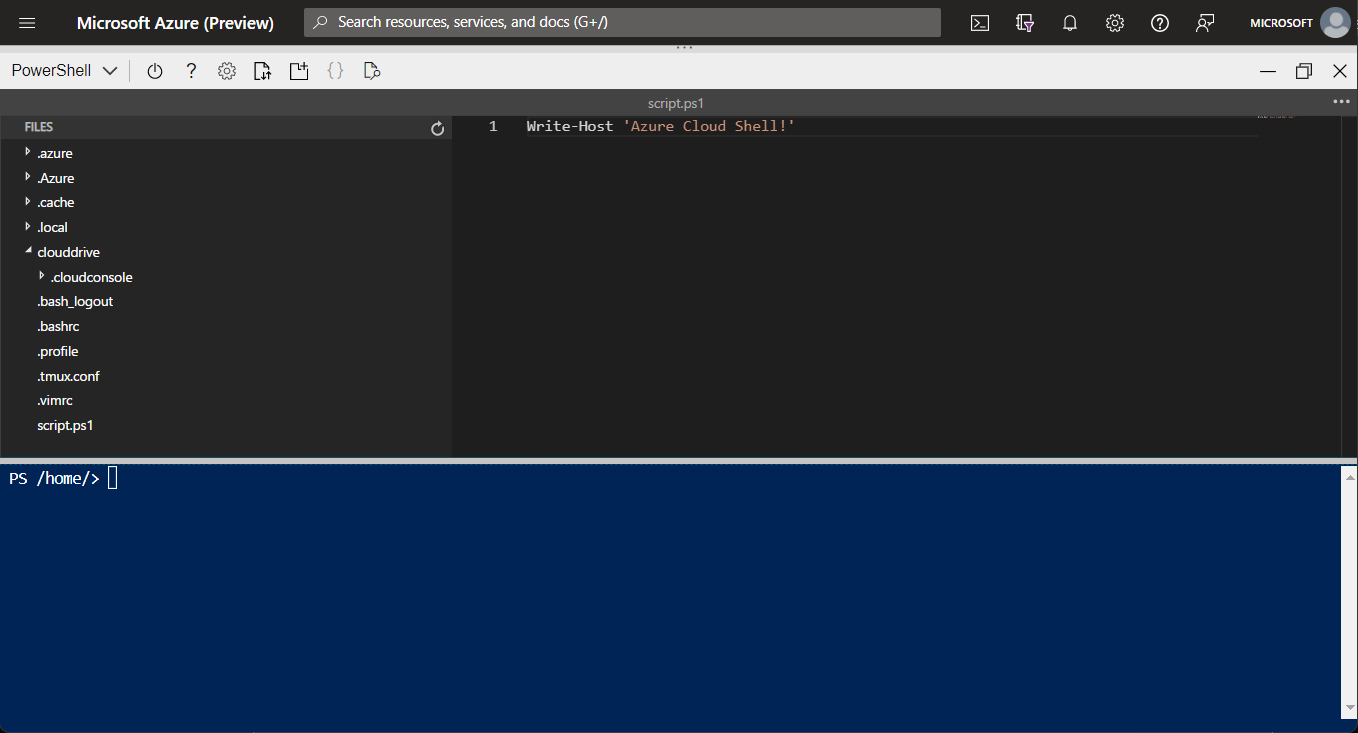
Scripts and data files can live beyond the temporary host. CloudDrive persists uploads so they behave like ordinary files in Bash or PowerShell, and you can also attach an Azure File Share to browse share contents from the shell. A share attachment is bound to one region, so one region holds the storage allocated for Cloud Shell.

Accessing persistent CloudDrive storage from Cloud Shell

Once files are in that persistent space you can list them, move between folders, upload new items, and download results with normal shell commands. Closing the laptop and later opening Cloud Shell on a different device still shows the same files.

code temp.txt

For quick fixes, choose the curly-brackets {} icon to launch the Cloud Shell editor, or type code followed by a filename at the prompt.

Opening the Cloud Shell editor to modify a file
Note

The code command runs only in Classic mode. Switch to it with the More (...) menu, then Settings and Go to Classic version.

7. In Classic mode, what exact command opens a file named temp.txt in the Cloud Shell editor from the prompt?
Show answer and explanation
  • code temp.txt

Typing code plus the filename launches the editor for that file when Classic mode is enabled.

8. The code command for launching the Cloud Shell editor works in all Cloud Shell interface modes with no setting change required.
  • True
  • False
Show answer and explanation
  • False

The code command works only in Classic mode, which is enabled through the More menu, Settings, and Go to Classic version.

9. An administrator maps an Azure File Share in Cloud Shell and wants Cloud Shell storage to span several Azure regions automatically. What is true about regions for Cloud Shell storage?
  • The share is tied to a specific region and only one region can hold Cloud Shell storage, so other regions need backup and synchronization.
  • Cloud Shell automatically replicates its storage to every Azure region with no extra work.
  • File Shares cannot be accessed from Cloud Shell under any configuration.
  • Region choice affects only the shell language and has no effect on file storage.
Show answer and explanation
  • The share is tied to a specific region and only one region can hold Cloud Shell storage, so other regions need backup and synchronization.

A File Share mapping is tied to a specific region and only one region can hold the Cloud Shell storage allocation, so multi-region access requires backup and synchronization.

Tools that are already installed

Each session arrives with common administration utilities preconfigured, which helps for containers, Kubernetes, configuration management, and infrastructure as code without fetching installers. Examples include Docker and Kubernetes tools alongside Terraform and Ansible.

Category

Tools included

Linux tools

bash, zsh, sh, tmux, dig

Azure tools

Azure CLI, AzCopy, Azure Functions CLI, Service Fabric CLI, Batch Shipyard, blobxfer

Text editors

code, vim, nano, emacs

Source control

git

Build tools

make, maven, npm, pip

Containers

Docker Machine, Kubectl, Helm, DC/OS CLI

Databases

MySQL client, PostgreSql client, sqlcmd Utility, mssql-scripter

Other

iPython Client, Cloud Foundry CLI, Terraform, Ansible, Chef InSpec, Puppet Bolt, HashiCorp Packer, Office 365 CLI

For full command syntax, consult the Azure CLI reference, an official reference hosted by Microsoft Learn.

10. Match each utility that is preinstalled in Azure Cloud Shell to the category it belongs to.
  • git
  • Kubectl
  • npm
  • sqlcmd Utility
  • Build tools
  • Containers
  • Databases
  • Source control
Show answer and explanation
  • git: Source control
  • Kubectl: Containers
  • npm: Build tools
  • sqlcmd Utility: Databases

git is the version-control tool in Cloud Shell.

Kubectl manages Kubernetes clusters and sits in the containers group.

npm builds JavaScript packages and sits in the build-tools group.

sqlcmd Utility connects to databases and sits in the databases group.

11. Which task can be completed directly in a fresh Azure Cloud Shell session without installing additional software?
  • Manage a Kubernetes cluster with Kubectl and Helm and apply infrastructure as code with Terraform and Ansible
  • Gain sudo administrator rights inside the shell to modify the underlying host operating system
  • Install an arbitrary custom agent that is not listed among Cloud Shell add-ons
  • Keep a single session active for several hours to run a long migration with no timeout
Show answer and explanation
  • Manage a Kubernetes cluster with Kubectl and Helm and apply infrastructure as code with Terraform and Ansible

Cloud Shell already includes Docker Machine, Kubectl, Helm, Terraform, and Ansible, so Kubernetes and infrastructure-as-code work needs no installer.

Choosing when Cloud Shell fits

Cloud Shell shines when you need a secure, zero-install prompt and a place to keep small working files.

Use Cloud Shell when you need to

  • Open a secure command-line session from any browser-based device

  • Interact with Azure resources without adding plug-ins to your device

  • Keep files available between sessions for later use

  • Work in either Bash or PowerShell to manage resources

  • Adjust scripts and configuration files in the built-in editor

Choose a different environment when you need to

  • Run scripts or activities longer than 20 minutes, because the session disconnects without warning and current state is lost

  • Obtain elevated rights such as sudo inside the CLI or PowerShell environment

  • Install tools that are not supported in the limited shell and instead need a custom virtual machine or container

  • Use storage from several regions, because only one region can hold Cloud Shell storage and the rest needs backup and synchronization

  • Open several sessions at once, because only one instance is allowed and concurrent work across subscriptions or tenants is not supported

Warning

Do not rely on Cloud Shell for long migrations or hour-long jobs. Plan those workloads on a virtual machine or automation service that does not time out after 20 minutes.

12. A support engineer is in an airport with only a kiosk browser and needs five minutes to restart an Azure virtual machine, run a stored diagnostic script, and make a small script edit. Why is Azure Cloud Shell a suitable choice for this work?
  • It opens a secure browser-based prompt with no plug-ins, supports Bash or PowerShell, persists files between sessions, and provides an editor for quick fixes.
  • It guarantees uninterrupted execution for scripts that run for many hours.
  • It provides sudo access and allows installation of any unsupported tool.
  • It allows many simultaneous sessions for concurrent work across tenants.
Show answer and explanation
  • It opens a secure browser-based prompt with no plug-ins, supports Bash or PowerShell, persists files between sessions, and provides an editor for quick fixes.

Cloud Shell gives a secure browser prompt with no plug-ins, persists files between sessions, supports Bash or PowerShell, and includes an editor, which matches short on-the-go tasks.

13. Azure Cloud Shell is a suitable place to run a script that must execute continuously for more than 20 minutes because the session will stay connected indefinitely.
  • True
  • False
Show answer and explanation
  • False

Sessions disconnect without warning after 20 minutes of inactivity and the in-memory state is lost, so long-running activities need another environment.

14. Azure Cloud Shell allows only one instance at a time and is therefore unsuitable for concurrent work across multiple subscriptions or tenants.
  • True
  • False
Show answer and explanation
  • True

Only a single Cloud Shell instance is permitted, so parallel multi-subscription or multi-tenant work requires a different setup.

15. An engineer who needs sudo-level permissions inside the shell or who must install tools that Cloud Shell does not support should use a custom virtual machine or container instead of Cloud Shell.
  • True
  • False
Show answer and explanation
  • True

Cloud Shell is a limited environment without sudo access and without support for arbitrary installers; a custom VM or container provides full control.

Extra questions

Storage1 exists in the subscription. The devices below will be considered for copying data to it.

NamePlatform
Device1Windows 10
Device2Linux
Device3macOS
16. From which of these devices can AzCopy be used to copy data into storage1?
  • Device1 only
  • Device1, Device2, and Device3
  • Device1 and Device2 only
  • Device1 and Device3 only
Show answer and explanation
  • Device1, Device2, and Device3

Current AzCopy v10 is a self-contained cross-platform binary shipped for Windows, Linux and macOS, so it runs on all three devices. Windows-only limits describe the retired v8 builds.

An on-premises host holds D:\Folder1. Its contents must be placed into the public container of the account contosodata.

17. Which command performs the required copy?
  • https://contosodata.blob.core.windows.net/public
  • azcopy sync D:\folder1 https://contosodata.blob.core.windows.net/public --snapshot
  • azcopy copy D:\folder1 https://contosodata.blob.core.windows.net/public --recursive
  • az storage blob copy start-batch D:\Folder1 https://contosodata.blob.core.windows.net/public
Show answer and explanation
  • azcopy copy D:\folder1 https://contosodata.blob.core.windows.net/public --recursive

Copying a local directory including subfolders to a container uses azcopy copy with --recursive. A bare URL is not a command, azcopy sync has no --snapshot flag and is meant for reconciliation, and start-batch performs server-side copies between storage locations, not from a local disk.

Four endpoint devices are under review for running Storage Explorer.

NamePlatform
Device1Windows
Device2Ubuntu Linux
Device3macOS
Device4Android
18. On which of these devices can Storage Explorer be installed?
  • Device1 only
  • Device1 and Device2 only
  • Device1 and Device3 only
  • Device1, Device2, and Device3 only
  • Device1, Device3, and Device4 only
Show answer and explanation
  • Device1, Device2, and Device3 only

Storage Explorer is a desktop program shipped for Windows, macOS and Linux including Ubuntu. No build exists for Android or other mobile systems, so any set naming Device4 or omitting a desktop platform is wrong.

A user named Admin1 in a new subscription tries to deploy a Marketplace item with a Resource Manager template through PowerShell and receives the following error.

User failed validation to purchase resources. Error message: 'Legal terms have not been accepted for this item on this subscription. To accept legal terms, please go to the Azure portal (http://go.microsoft.com/fwlink/?LinkId=534873) and configure programmatic deployment for the Marketplace item or create it there for the first time.'

Admin1 must be able to deploy that Marketplace resource.

19. What should you do to let Admin1 deploy successfully?
  • From Azure PowerShell, run the Set-AzApiManagementSubscription cmdlet
  • From the Azure portal, register the Microsoft.Marketplace resource provider
  • From Azure PowerShell, run the Set-AzMarketplaceTerms cmdlet
  • From the Azure portal, assign the Billing administrator role to Admin1
Show answer and explanation
  • From Azure PowerShell, run the Set-AzMarketplaceTerms cmdlet

The failure states the offer legal terms are unaccepted for the subscription, blocking programmatic deployment. Accepting them with Set-AzMarketplaceTerms for that publisher, product and plan clears the block. Managing API Management subscriptions, registering a nonexistent Marketplace provider, or granting a billing role does not accept offer terms.

That's the end of the free part

Up next: ARM Templates and Infrastructure as Code

27 more pages and 1081 questions in the full study guide.

See what is in AZ-104 Azure Administrator Book: Study Guide & Exam Questions
Page 1 of 28