Brixus
  1. Courses
  2. Certification Study Guides
  3. AZ-802 Windows Server Study Guide & Exam Questions
  4. Read
AZ-802 Windows Server Study Guide & Exam Questions
  • 1.Part 1: Active Directory Domain Services: Domain Controllers, Objects, Trusts and Group Policy
    • 1. AD DS Fundamentals: Forests, Domains and Domain Controller Deployment
    • 2. AD DS Domain Controllers on Azure IaaS Virtual Machines
    • 3. FSMO Roles, Global Catalog, Schema and Domain Controller Maintenance
    • 4. AD DS Users, Groups, Computers and Organizational Units
    • 5. Hybrid Identity: Microsoft Entra Connect Sync and Seamless SSO
    • 6. Microsoft Entra Domain Services for Windows Server Workloads
    • 7. Group Policy Objects: Processing Order, Scope, Inheritance and Filtering
    • 8. Domain GPOs, SYSVOL Storage, Administrative Templates and Password Policies
    • 9. AD DS Trust Relationships, Custom Partitions and AD DS Monitoring
  • 2.Part 2: Remote and Hybrid Management: Windows Admin Center, PowerShell, Azure Arc and Automation
  • 3.Part 3: Hyper-V and Azure Virtual Machines: Configuration, Availability and Networking
  • 4.Part 4: DNS, DHCP and IPAM for On-Premises and Hybrid Networks
  • 5.Part 5: Storage and File Services: Azure Files, File Sync, Storage Spaces, SMB and BitLocker
  • 6.Part 6: Securing Windows Server and AD DS: Hardening, Defender and Credential Protection
  • 7.Part 7: Monitoring and Troubleshooting Windows Server: Performance, Logs, Azure Monitor and Recovery

Your progress is not saved. You are trying this lesson as a guest, so your answers and progress are not saved.

1.1 AD DS Fundamentals: Forests, Domains and Domain Controller Deployment

Active Directory Domain Services (AD DS) and its related services underpin enterprise networks that run Windows and non-Windows operating systems. The AD DS database centrally stores domain objects, including user accounts, computer accounts, and groups. AD DS provides a searchable hierarchy and a way to apply configuration and security settings to those objects.

Logical design and physical deployment

Logical components organize the directory. Physical components are tangible or describe tangible parts of the deployment. A domain, for example, organizes objects for administration; a site groups objects associated with a physical location.

Logical component

What it does

Partition

A portion of the AD DS database, also called a naming context. The schema partition holds the schema; the configuration partition holds forest configuration objects; the domain partition holds objects specific to the domain. Copies on multiple domain controllers are updated through directory replication.

Schema

Defines the object types and attributes used to create objects in AD DS.

Domain

An administrative container for objects. It maps to a specific partition and can be related to other domains in a parent-child hierarchy.

Domain tree

A hierarchy of domains with a common root domain and a contiguous Domain Name System (DNS) namespace.

Forest

A top-level collection of one or more domain trees whose domains share an AD DS root, a schema, and a global catalog.

Organizational unit (OU)

Contains users, groups, and computers and supports delegation of administrative rights and administration through linked Group Policy Objects (GPOs).

Container

Organizes objects. You can use default containers or create custom ones, but you cannot link GPOs to them.

Physical component

What it does

Domain controller

Holds a copy of the AD DS database. For most operations, each domain controller can process changes and replicate them to the other domain controllers in its domain.

Data store

Each domain controller has a copy. The database uses the Extensible Storage Engine (ESE) and stores directory information in Ntds.dit and associated log files, in C:\Windows\NTDS by default.

Global catalog server

A domain controller that hosts the global catalog, a partial, read-only copy of all objects in a multiple-domain forest. It speeds up searches for objects that might reside in another domain in the forest.

Read-only domain controller (RODC)

A read-only installation of AD DS, common in branch offices where physical security or IT support is limited or a line-of-business application needs to run on a domain controller.

Site

Groups AD DS objects, such as computers and services, associated with a physical location.

Subnet

A portion of an organization’s network IP addresses assigned to computers in a site. A site can have more than one subnet.

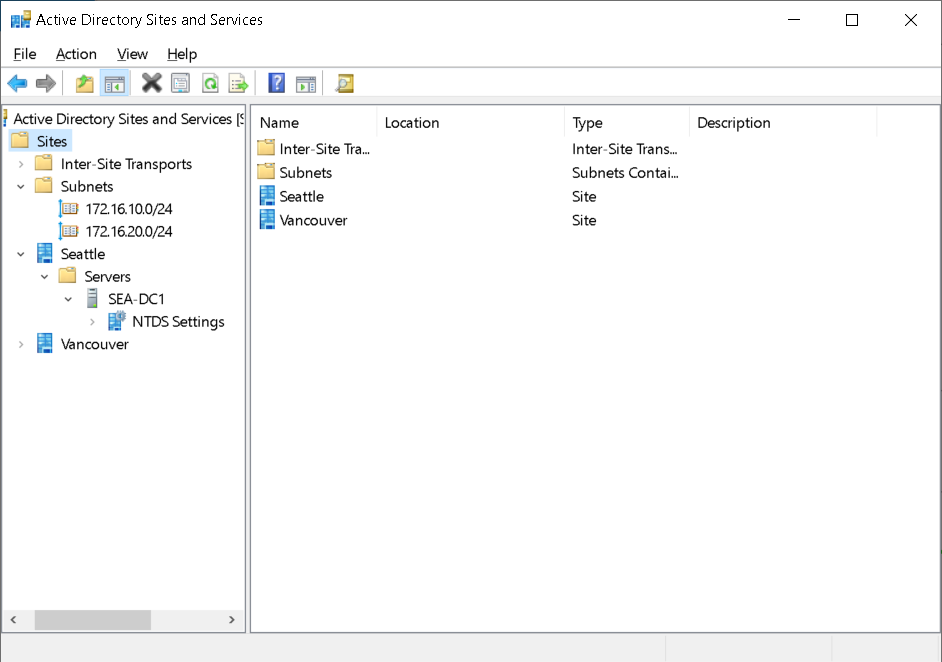
Active Directory Sites and Services shows the Seattle and Vancouver sites, along with two subnets.
1. Match each AD DS design task to the component that addresses it. Distinguish logical administration, physical location, and forest-wide search.
  • Delegate administrative rights and link Group Policy Objects for a set of directory objects.
  • Group computers and services by physical location.
  • Speed up searches for objects that might be stored in another domain in the forest.
  • Define which object types and attributes are used to create directory objects.
  • Global catalog server
  • Organizational unit
  • Schema
  • Site
Show answer and explanation
  • Delegate administrative rights and link Group Policy Objects for a set of directory objects.: Organizational unit
  • Group computers and services by physical location.: Site
  • Speed up searches for objects that might be stored in another domain in the forest.: Global catalog server
  • Define which object types and attributes are used to create directory objects.: Schema

An OU supports administrative delegation and GPO links.

A site represents a physical location, unlike a domain’s logical structure.

A global catalog server hosts a partial, read-only copy of all objects in a multiple-domain forest.

The schema defines the object types and attributes used in AD DS.
2. In AD DS, an administrator can link a Group Policy Object to a custom container in the same way as to an organizational unit.
  • True
  • False
Show answer and explanation
  • False

An organizational unit supports Group Policy Object links; a container does not, even if it is custom.

Forests, domains, and boundaries

A forest can consist of one domain with one domain controller or span several domains across multiple trees. Typically, an organization creates only one forest. In the Contoso.com Forest example, three trees connect directly to the forest. Their domain memberships are shown, but no links between individual domains are drawn.

  • Contoso domain tree: contoso.com, IT.Contoso.com, Dev.Contoso.com, HR.Contoso.com, and mail.Contoso.com.

  • Tailspin Toys domain tree: tailspin.com, Design.Tailspin.com, and Sales.Tailspin.com.

  • Fabrikam domain tree: fabrikam.com, Shipping.Fabrikam.com, HR.Fabrikam.com, and IT.Fabrikam.com.

Diagram: Contoso domain tree, contoso.com, IT.Contoso.com, Dev.Contoso.com, HR.Contoso.com, mail.Contoso.com, Tailspin Toys domain tree, tailspin.com, Design.Tailspin.com, Sales.Tailspin.com, Fabrikam domain tree, fabrikam.com, Shipping.Fabrikam.com, HR.Fabrikam.com, IT.Fabrikam.com, Contoso.com Forest

The forest root domain is the first domain created in a forest. The example identifies Contoso.com as the forest root, Adatum.com as the root of a separate tree, and Seattle.contoso.com as a child of Contoso.com. The drawing places Adatum.com above Contoso.com and draws an arrow from Adatum.com to Contoso.com, followed by an arrow from Contoso.com to Seattle.contoso.com. Distinguish that visual hierarchy from the domain structure: Seattle.contoso.com is the child within the Contoso tree; Adatum.com is labeled as a separate tree root.

Diagram: Adatum.com - Tree root domain, Contoso.com - Forest root domain, Seattle.contoso.com - Child domain

The forest root domain contains the Enterprise Admins and Schema Admins groups. The schema master and domain naming master roles are initially assigned to the first domain controller in the root domain but can move to other domain controllers anywhere in the forest.

Scope

Boundary or function

Implication

Forest

Security boundary

By default, users outside the forest cannot access resources inside it. Domains inside the forest automatically trust one another, making it easier to grant access across domains.

Forest

Replication boundary

The schema and configuration partitions and the global catalog replicate within the forest boundary. Applications with incompatible schemas require additional forests.

Domain

Replication boundary

Object changes replicate to the other domain controllers in the domain. In a multiple-domain forest, only subsets of the changes replicate to other domains.

Domain

Administrative unit

By default, the Administrator account belongs to Domain Admins; Domain Admins belongs to every local Administrators group on domain-joined computers and has full control over domain objects. The forest root Administrator account has additional rights.

3. An organization needs to deploy applications with incompatible AD DS schemas. The schema partition replicates within a forest. Which design meets this requirement?
  • Use separate forests.
  • Use separate domains in the same forest.
  • Use separate sites in the same forest.
Show answer and explanation
  • Use separate forests.

Domains within a forest share a schema, so the organization must deploy additional forests for incompatible schemas.

4. In a multiple-domain AD DS forest, changing a domain object causes every change to replicate to domain controllers in every other domain.
  • True
  • False
Show answer and explanation
  • False

Domain object changes replicate to other domain controllers in the same domain; only subsets of the changes replicate to other domains.

Domain objects and access decisions

An AD DS domain manages different types of objects independently. In the domain illustration, AD DS branches to Users, Computers, and Groups, with no links between those three categories. The icons show an individual user, a computer with a lock, and a group of people, respectively.

Diagram: AD DS, Users, Computers, Groups

Object

How it is used

User accounts

Hold the information needed to authenticate users at sign-in and build their access tokens.

Computer accounts

Represent domain-joined computers, much as user accounts represent users.

Groups

Organize users or computers to simplify management of permissions and Group Policy Objects in the domain.

Authentication verifies credentials to establish a computer’s or user’s identity when a domain-joined computer starts or a user signs in to one. Authorization is the subsequent decision: Windows uses access controls to determine whether an authenticated user can access a resource.

5. In an AD DS domain, verifying a user’s credentials at sign-in is ____; deciding whether that authenticated user can access a resource is ____.
  • administrative delegation
  • authentication
  • authorization
  • directory replication
Show answer
  • In an AD DS domain, verifying a user’s credentials at sign-in is authentication; deciding whether that authenticated user can access a resource is authorization.
6. An AD DS administrator wants to organize users or computers so that permissions and Group Policy Objects are easier to manage for them collectively. Which object serves that purpose?
  • A group
  • An individual user account
  • An individual computer account
Show answer and explanation
  • A group

Groups organize users or computers to simplify permissions and Group Policy Object management.

Trust paths across domains and forests

Trust relationships enable resource access across domains or forests. In a multiple-domain forest, automatic two-way transitive trusts create a trust path between all domains. Transitivity means that if domain A trusts domain B and domain B trusts domain C through transitive trusts, domain A trusts domain C.

Trust type

Transitivity

Direction

When it is used

Parent and child

Transitive

Two-way

Created when a new domain is added to an existing AD DS tree.

Tree-root

Transitive

Two-way

Created automatically when a new tree is added to an existing forest.

External

Nontransitive

One-way or two-way

Enables resource access with a Windows NT 4.0 domain or an AD DS domain in another forest; can support a migration.

Realm

Transitive or nontransitive

One-way or two-way

Creates an authentication path between a Windows Server AD DS domain and a Kerberos version 5 realm using a directory service other than AD DS.

Forest (complete or selective)

Transitive

One-way or two-way

Allows two AD DS forests to share resources.

Shortcut

Transitive

One-way or two-way

Reduces authentication time between domains in different parts of the same forest. None exist by default; an administrator creates one if required.

7. In a multiple-domain AD DS forest, if domain A trusts domain B and domain B trusts domain C through automatic transitive trusts, domain A has a trust path to domain C.
  • True
  • False
Show answer and explanation
  • True

Automatic trusts in the forest are transitive, so the trust path extends through domain B to domain C.

8. Two domains in different parts of the same AD DS forest already have a trust path. Which trust can an administrator create specifically to reduce authentication time between them?
  • Shortcut trust
  • External trust
  • Realm trust
  • Forest trust
Show answer and explanation
  • Shortcut trust

A shortcut trust reduces authentication time between domains in different parts of the same forest and does not exist by default.

Deploying domain controllers

Domain controllers authenticate users and computers in a domain, so their number and placement matter, especially in distributed environments. On-premises deployment separates installation of the AD DS files from configuration of the role.

  1. Install the AD DS role binaries using Windows Admin Center or Server Manager. The files are present after this step, but AD DS is not yet configured.

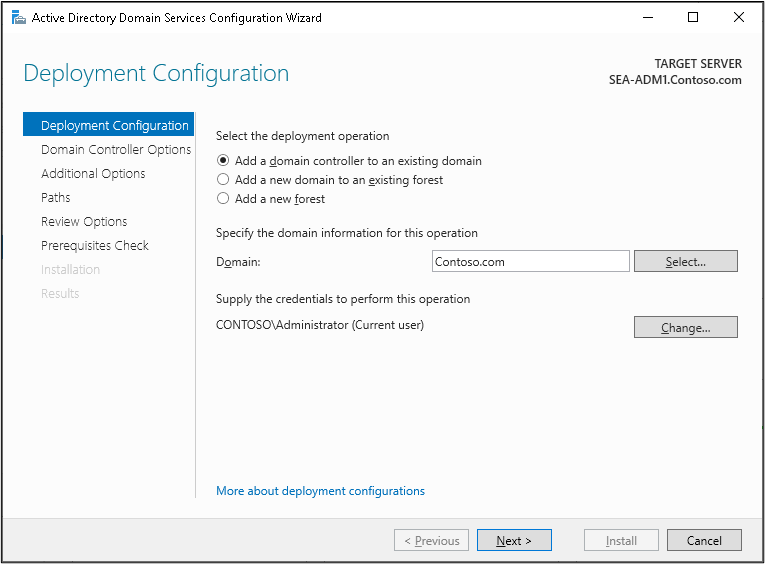
  2. Configure the AD DS role. In Server Manager, select the AD DS link to open the Active Directory Domain Services Configuration Wizard.

The Deployment Configuration page of the Active Directory Domain Services Configuration Wizard.

Configuration decision

What to specify or check

Deployment type

Choose a new forest, new tree, or additional domain controller for an existing domain. The choice determines what other information may be needed, such as the parent domain name.

DNS name

Specify the fully qualified domain name (FQDN) for the first controller in a domain. Use the existing domain name when adding a controller to an existing domain or forest.

Forest functional level

Determines available forest features and supported domain controller operating systems. It also sets the minimum domain functional level.

Domain functional level

Determines available domain features and supported domain controller operating systems.

DNS server

You can install the DNS role during deployment.

Global catalog

Hosting the global catalog is selected by default.

Read-only domain controller

Not available for the first domain controller in a forest.

Directory Services Restore Mode (DSRM) password

Required for restoring AD DS database objects from a backup.

NetBIOS name

Specify it when creating the first domain controller for a domain.

File locations

The database and logs default to C:\Windows\NTDS; SYSVOL defaults to C:\Windows\SYSVOL.

Server Core does not have the local Server Manager graphical interface. Alternatives include Windows Admin Center, Server Manager, Windows PowerShell, and Remote Server Administration Tools (RSAT) on a supported Windows Server with Desktop Experience or a supported Windows client.

9. After installing the AD DS binaries on a Windows Server computer, the server is already configured as a domain controller.
  • True
  • False
Show answer and explanation
  • False

Installing the binaries places the files on the server; configuring the AD DS role is a separate step.

10. An administrator is configuring a new AD DS forest. Which setting establishes the minimum permitted domain functional level in that forest?
  • Forest functional level
  • The DNS server option
  • The global catalog option
Show answer and explanation
  • Forest functional level

The forest functional level sets the minimum domain functional level as well as determining available forest features and supported domain controller operating systems.

11. An administrator can select the read-only domain controller option when configuring the first domain controller in an AD DS forest.
  • True
  • False
Show answer and explanation
  • False

The read-only domain controller option is unavailable for the first domain controller in a forest.

Branch deployment and upgrades

If the connection to a remote site is slow, unreliable, or costly, Install from media (IFM) reduces traffic over the wide area network (WAN). Create an AD DS backup and take it to the remote site, then select Install from media in Server Manager. Most copying occurs locally from the backup; only security-related traffic and AD DS changes made after the backup traverse the WAN.

Diagram: Central site, Central AD DS environment, AD DS backup media, Remote site, New domain controller at remote site, Carry backup to remote site

An RODC can reduce the potential information loss if a branch office cannot guarantee physical security. It holds a read-only database copy. The Password Replication Policy (PRP) governs credential caching and is edited from the RODC’s computer account in Active Directory Users and Computers.

  • Limit caching. By default, no passwords are cached except those permitted through the built-in Allowed RODC Password Replication Group. Allow only branch users and computers that need caching, and keep domain admins and other privileged accounts denied.

  • Prepare and audit. Prepopulate permitted passwords to reduce sign-in dependence on the WAN. Use the Advanced view to see which credentials have been cached.

  • Respond to loss or theft. Delete the RODC account and select the option to reset passwords for accounts whose credentials it cached.

  • Separate administrative rights. Use administrator role separation to delegate local maintenance to a branch user or group without granting domain-wide privileges. Set it during promotion or afterward using dsmgmt.

To upgrade to a Windows Server 2025 domain, you can upgrade the OS on existing domain controllers running Windows Server 2016 or later, or add Windows Server 2025 domain controllers to the existing domain; either way, the domain and forest must already be at the Windows Server 2016 functional level or higher. Adding new controllers is recommended because it gives you a clean OS and AD DS database installation. Windows Server automatically updates domain DNS records so clients can find and use a newly added controller.

12. An administrator uses Install from media to deploy an additional AD DS domain controller at a branch with a slow WAN link. What traffic still uses the WAN during this deployment?
  • Security-related traffic and AD DS changes made after the backup
  • The entire backup instead of changes made after it
  • No traffic at all once local copying starts
Show answer and explanation
  • Security-related traffic and AD DS changes made after the backup

Most copying takes place locally; the WAN carries security-related traffic and directory changes made after the backup.

13. Match each AD DS branch-office objective to the RODC feature or action that meets it.
  • Allow branch credentials to be cached while keeping privileged accounts denied.
  • Reduce dependence on the WAN for branch sign-ins by placing permitted passwords on the RODC beforehand.
  • Let branch staff patch and reboot the RODC without granting domain-wide privileges.
  • Check which credentials the RODC has actually cached.
  • Administrator role separation
  • Advanced view
  • Password Replication Policy
  • Prepopulate permitted passwords
Show answer and explanation
  • Allow branch credentials to be cached while keeping privileged accounts denied.: Password Replication Policy
  • Reduce dependence on the WAN for branch sign-ins by placing permitted passwords on the RODC beforehand.: Prepopulate permitted passwords
  • Let branch staff patch and reboot the RODC without granting domain-wide privileges.: Administrator role separation
  • Check which credentials the RODC has actually cached.: Advanced view

The Password Replication Policy governs which credentials the RODC can cache.

Prepopulating permitted passwords makes them available on the RODC in advance.

Administrator role separation delegates local administrative rights only.

The Advanced view lets administrators audit cached credentials.

14. Why is adding new Windows Server 2025 domain controllers recommended over upgrading the OS on the existing controllers?
  • It gives you a clean installation of both the OS and the AD DS database.
  • It avoids all changes to the domain’s DNS records.
  • It is the only supported method because existing controllers cannot be upgraded.
Show answer and explanation
  • It gives you a clean installation of both the OS and the AD DS database.

Adding new controllers provides a clean installation of both Windows Server 2025 and the AD DS database.

Moving a domain controller to a new site

A new site groups objects by physical location, and a subnet associates the location’s network addresses with that site. Moving a domain controller there helps reduce traffic and delay from contacting a distant site for authentication and authorization queries. The Ludington example follows three steps.

  1. Create the site. In Active Directory Sites and Services, right-click Sites, select New Site, name it, associate it with the appropriate site link, and select OK.

  2. Map the subnet. Right-click Subnets and select New Subnet. Enter the address and mask, select the new site, and select OK.

  3. Move the controller. Expand the original site, its Servers folder, and the server. Right-click the controller’s NTDS Settings object, select Move, choose the new site, and select OK.

The corresponding PowerShell commands create the Ludington site, associate a subnet, and move the controller, in that order.

New-ADReplicationSite -Name "Ludington" -Description "Site for new facility in Ludington MI."
New-ADReplicationSubnet -Name "192.168.1.0/24" -Site "Ludington"
Move-ADDirectoryServer -Identity "DC2.WestMI" -Site "Ludington"
15. An organization is opening a new location. It wants to group AD DS objects by physical location, associate the location’s subnet, and move an existing domain controller there. Put the Active Directory Sites and Services tasks in deployment order.
  • Create the site and associate it with the appropriate site link.
  • Create the subnet and associate it with the new site.
  • Move the domain controller to the new site.
Show answer
  1. Create the site and associate it with the appropriate site link.
  2. Create the subnet and associate it with the new site.
  3. Move the domain controller to the new site.

Operations master roles and role moves

AD DS uses multiple-master replication so changes can originate on different domain controllers. It automatically resolves conflicting simultaneous updates. Operations that do not suit this model instead use a Flexible Single Master Operation (FSMO) role, also called an operations master role. For a role-specific change, connect to the controller holding that role.

By default, the first domain controller in a forest holds all five roles. After additional controllers are deployed, roles can stay together or be distributed. Each forest has one schema master and one domain naming master. Each domain has one RID master, one infrastructure master, and one PDC emulator.

Scope

Role

Responsibility and impact if unavailable

Forest

Schema master

Processes all schema changes. If unavailable, the schema cannot be changed.

Forest

Domain naming master

Handles adding and removing domains and changing domain names. If unavailable, you cannot add domains to the forest.

Domain

Relative ID (RID) master

Allocates RID blocks to domain controllers so they can build unique security IDs (SIDs) for security principals. If unavailable, controllers eventually exhaust their existing RIDs and cannot create new objects.

Domain

Infrastructure master

Maintains references to objects in other domains, including updates that associate SIDs with security principal names. If unavailable, domain controllers that are not global catalogs cannot perform this translation.

Domain

Primary domain controller (PDC) emulator master

Serves as the domain time source, receives GPO changes by default, and receives urgent password changes. A controller can check with it for a recent password change at sign-in. If unavailable, users might have trouble signing in until their password changes replicate.

Warning

Do not place the infrastructure master on a global catalog server unless every domain controller in its domain is a global catalog. In that case, every controller already knows about every object in the forest, so the infrastructure master role is not necessary; the same holds once Active Directory Recycle Bin is enabled, because each controller then updates its own cross-domain references.

Each child domain’s PDC emulator synchronizes time with a domain controller in its parent domain, so time flows down from the forest root domain. Configure the forest root PDC emulator to synchronize with a reliable external time source. In Windows PowerShell, Get-ADForest shows the forest role holders, while Get-ADDomain shows the domain role holders.

16. Match each AD DS requirement to the operations master role that handles it.
  • Change definitions of directory object types or attributes.
  • Add a domain to an existing forest.
  • Supply controllers with identifier blocks to build unique SIDs.
  • Maintain a reference to a group member from another domain.
  • Check a recent password change that has not yet replicated to the local controller.
  • Domain naming master
  • Infrastructure master
  • PDC emulator master
  • RID master
  • Schema master
Show answer and explanation
  • Change definitions of directory object types or attributes.: Schema master
  • Add a domain to an existing forest.: Domain naming master
  • Supply controllers with identifier blocks to build unique SIDs.: RID master
  • Maintain a reference to a group member from another domain.: Infrastructure master
  • Check a recent password change that has not yet replicated to the local controller.: PDC emulator master

All schema changes are made on the schema master.

The domain naming master must be contacted when adding or removing domains or making domain name changes.

The RID master allocates blocks of RIDs so different controllers do not assign duplicate SIDs.

The infrastructure master maintains references to objects in other domains.

The PDC emulator receives urgent password changes, so the local controller can check with it during sign-in.

17. If the AD DS RID master is unavailable, domain controllers can still use their existing RID allocations until they run out.
  • True
  • False
Show answer and explanation
  • True

Controllers use their remaining RIDs to build SIDs, but cannot create new objects once those allocations are exhausted.

18. A domain’s PDC emulator is the time source for that domain. What should the forest root domain’s PDC emulator synchronize with?
  • A reliable external time source
  • The PDC emulator in a child domain
  • The domain controller that holds the RID master role because it holds that role
Show answer and explanation
  • A reliable external time source

Child domains take their time from their parent domains, so the forest root PDC emulator is the top of the hierarchy and should synchronize with a reliable external time source.

Transfer or seize a role

A transfer is a planned move between two online domain controllers. During a transfer, the current holder’s latest role data replicates to the target. Seizure is an emergency move when the current holder is unavailable. Seize only as a last resort when there is no chance of recovering the current holder.

Role

Snap-in for transfer

Schema master

Active Directory Schema

Domain-naming master

Active Directory Domains and Trusts

Infrastructure master

Active Directory Users and Computers

RID master

Active Directory Users and Computers

PDC emulator master

Active Directory Users and Computers

AD DS snap-ins can transfer but cannot seize roles. Both ntdsutil.exe and Windows PowerShell can transfer or seize them. In this PowerShell syntax, -Identity names the target domain controller, -OperationMasterRole takes a comma-separated list of roles, and the optional -Force switch seizes the roles when a graceful transfer is not possible.

Move-ADDirectoryServerOperationMasterRole -Identity "<servername>" -OperationMasterRole <rolenamelist> -Force

The demonstration uses a single-domain forest with two domain controllers. It identifies the role holders, transfers the roles to the other controller using graphical tools, and then transfers them back using command-line tools.

Watch the video

19. An administrator plans to move an AD DS operations master role while both the current holder and the target domain controller are online. Which operation moves the role and replicates the latest role data to the target?
  • Transfer the role.
  • Seize the role.
Show answer and explanation
  • Transfer the role.

A transfer is a planned operation between online controllers and replicates the current holder’s latest role data to the target.

20. When an AD DS operations master role holder is unrecoverable, the snap-in used for a planned transfer can also seize the role.
  • True
  • False
Show answer and explanation
  • False

AD DS snap-ins can transfer roles but cannot seize them. Seizure requires Windows PowerShell or ntdsutil.exe.

Extra questions

A forest spans three sites called Site1, Site2 and Site3, each holding two domain controllers joined by DEFAULTIPSITELINK. A new branch office with only client computers has opened. Those clients should mainly use the domain controllers in Site1 for authentication.

21. You create an OU for the branch computers and enable the Try Next Closest Site setting through a GPO linked to that OU. Does this meet the goal?
  • True
  • False
Show answer and explanation
  • False

Client site membership comes from matching the client IP address to subnet objects, and the new office has no covering subnet so its clients belong to no site and can use any domain controller. Try Next Closest Site only alters fallback when the own site has no domain controller available, directing the client to the lowest-cost site link. With all sites on DEFAULTIPSITELINK at equal cost there is no preference for Site1, and linking the setting to an OU only controls who receives it.

22. You enable the Try Next Closest Site setting through a GPO linked to Site1. Does this meet the goal?
  • True
  • False
Show answer and explanation
  • False

A site-linked GPO reaches only computers whose addresses map to that site via a subnet object. Without a subnet for the branch, its clients are not in Site1 and never get the GPO. Even if they did, Try Next Closest Site does not assign clients to a site; it only prefers the lowest-cost link when the own site is unavailable, and equal DEFAULTIPSITELINK costs give Site1 no advantage. Mapping the branch subnet to Site1 is the change that places clients there.

23. You create a new site named Site4 and attach it to DEFAULTIPSITELINK. Does this meet the goal?
  • True
  • False
Show answer and explanation
  • False

A site contains computers only through associated subnet objects, so an empty Site4 places no branch clients anywhere and they remain site-less. Even adding the branch subnet to Site4 would fail the goal because Site4 has no domain controllers and clients would pick the closest site by link cost, with Site1, Site2 and Site3 all equal on DEFAULTIPSITELINK. Associating the branch subnet directly with Site1 puts the clients in Site1.

24. You create a subnet object for the branch address range and associate it with Site1. Does this meet the goal?
  • True
  • False
Show answer and explanation
  • True

A domain controller maps the client IP address to subnet objects to tell the client its site, which the client caches and then uses to query site-specific SRV records. Associating the branch range with Site1 makes those clients members of Site1, so locator returns Site1 domain controllers first. Design guidance recommends adding a location without its own domain controllers to the site with the best connectivity, with no site-link change needed.

25. Your AD DS domain contoso.com was created with Windows Server 2022 controllers with forest and domain functional levels raised as high as those controllers allow. A custom program will need a controller running an older Windows Server release. What is the earliest Windows Server release that can still serve as a controller in contoso.com?
  • Windows Server 2012 R2
  • Windows Server 2016
  • Windows Server 2019
  • Windows Server 2022
Show answer and explanation
  • Windows Server 2016

The functional level determines which operating-system versions may serve as domain controllers. Windows Server 2019 and 2022 introduce no level of their own, so the highest level they can use is Windows Server 2016. A domain built with 2022 controllers at that ceiling therefore runs at Windows Server 2016 functional level, which accepts controllers on Windows Server 2016, 2019, 2022, and 2025. Windows Server 2012 R2 controllers demand Windows Server 2012 R2 level or lower and are excluded. Later versions are also permitted, but the oldest permitted release is 2016.

26. Your AD DS forest includes a user named User1. You add a read-only domain controller named RODC1. You must make User1 a local administrator of RODC1 alone while granting as little additional privilege as possible. What should you use?
  • System Configuration
  • dsmgmt.exe
  • Computer Management
  • Active Directory Sites and Services
Show answer and explanation
  • dsmgmt.exe

Read-only domain controllers offer administrator role separation, allowing an ordinary domain user to hold local administrative authority on a single RODC without gaining domain-wide rights. That delegation is assigned during promotion or later with dsmgmt.exe through its local roles context, which places the account into the Administrators role of that RODC only. A domain controller has no standalone local account database, so Computer Management would target the domain built-in Administrators group and would elevate the user on every domain controller. System Configuration manages boot and startup behavior, not roles or membership. Active Directory Sites and Services handles sites, subnets, site links, and replication links, not per-RODC administration.

A forest operates at Windows Server 2012 R2 forest functional level and holds the following domains. You create a user named Admin1 and must let that user introduce a Windows Server 2022 domain controller into east.contoso.com while granting the smallest sufficient privilege.

NameOperating system of all domain controllersDomain functional level
contoso.comWindows Server 2016Windows Server 2012 R2
east.contoso.comWindows Server 2019Windows Server 2016
27. To which groups should you add Admin1?
  • EAST\Domain Admins only
  • CONTOSO\Enterprise Admins only
  • CONTOSO\Schema Admins and EAST\Domain Admins
  • CONTOSO\Enterprise Admins and CONTOSO\Schema Admins
Show answer and explanation
  • EAST\Domain Admins only

Adding a replica domain controller to an existing domain needs Domain Admins rights in that domain. Forest preparation and schema extension are unnecessary because Windows Server 2019 and Windows Server 2022 share schema version 88, already introduced when the first 2019 controller was added, and the functional levels satisfy the 2008 minimum. Enterprise Admins would work but grants excessive forest-wide power, and Schema Admins is only needed for a schema upgrade such as for Windows Server 2025 with schema version 91.

Domain contoso.com spans sites Site1 and Site2 and holds the listed servers. Group Group1 contains Server3. Read-only domain controller RODC1 enforces the listed Password Replication Policy. Three users were created with the listed memberships, and User2 has signed in to Server2.

NameIn siteType
DC1Site1Domain controller
DC2Site1Domain controller
RODC1Site2Read-only domain controller (RODC)
Server1Site1Member server
Server2Site2Member server
Server3Site2Member server
Groups, users and computersSetting
Account OperatorsDeny
AdministratorsDeny
Allowed RODC Password Replication GroupAllow
Backup OperatorsDeny
Denied RODC Password Replication GroupDeny
Group1Allow
Server OperatorsDeny
NameMember of
User1Domain Admins, Group1
User2Group1
User3Account Operators
28. If User1 authenticates through RODC1, the credentials will be cached on RODC1.
  • True
  • False
Show answer and explanation
  • False

A Deny entry outweighs any Allow. User1 belongs to Group1 with Allow, but Domain Admins membership places the account under Deny through the denied replication group and Administrators, so RODC1 never caches the password, although authentication can still be forwarded while a writable controller is reachable.

29. User2 can sign in to Server3 when connectivity between Site1 and Site2 is lost.
  • True
  • False
Show answer and explanation
  • True

Signing in to Server2 caused RODC1 to forward authentication to a writable controller and then cache User2, who is allowed through Group1. Server3 is also in Group1, so its computer password is cached on RODC1 as well, allowing User2 to sign in to Server3 even when Site1 is unreachable.

30. User3 is permitted to sign in locally to RODC1.
  • True
  • False
Show answer and explanation
  • True

Local sign-in rights are separate from caching. Account Operators receive Allow log on locally on domain controllers through the Default Domain Controllers Policy, which covers RODC1. The Deny replication entry only prevents caching, so User3 still signs in with authentication forwarded to a writable controller.

A single-domain Active Directory Domain Services forest named contoso.com has one Active Directory site. A read-only domain controller will be placed in a new datacenter on Server1, whose local Administrators group includes User1. The deployment must satisfy the aims below.

  • Let User1 carry out the read-only domain controller setup on Server1.
  • Place Server1 in a fresh site called RemoteSite1.
  • Grant only the minimum necessary privileges.
31. Step 1: ____ Step 2: ____ Step 3: ____

Order the three recommended actions.

  • Add User1 to the Contoso\Administrators group.
  • Create a site and a subnet.
  • Create a site link.
  • Instruct User1 to run the Active Directory Domain Services installation Wizard on Server1.
  • Pre-create an RODC account.
Show answer
  • Step 1: Create a site and a subnet. Step 2: Pre-create an RODC account. Step 3: Instruct User1 to run the Active Directory Domain Services installation Wizard on Server1.

An Active Directory Domain Services forest named adatum.com contains the accounts below. A workgroup server named RODC1 runs Windows Server and has a local administrator called User4. A read-only domain controller account named RODC1 is prestaged in east.adatum.com with installation and administration delegated to User3. You sign in to RODC1 as User4 to attach it to the prestaged account.

NameIn domainMember of
User1adatum.comADATUM\Enterprise Admins, Domain Users
User2east.adatum.comEAST\Domain Admins, Domain Users
User3east.adatum.comDomain Users
32. Which credentials may be supplied to promote RODC1 to a read-only domain controller in east.adatum.com?
  • User3 only
  • User3 and User1 only
  • User3 and User2 only
  • User1, User2, and User3
Show answer and explanation
  • User1, User2, and User3

Attaching the server to the prestaged account can be done by the delegated user, by a Domain Admins member of that domain, or by an Enterprise Admins member. User3 holds the delegation, User2 belongs to Domain Admins in the account domain, and User1 belongs to Enterprise Admins in the forest root, which has administrative rights in every domain.

Page 1 of 73AD DS Domain Controllers on Azure IaaS Virtual Machines