Brixus
  1. Courses
  2. Certification Study Guides
  3. DP-420 Azure Cosmos DB Study Guide & Exam Questions
  4. Read
DP-420 Azure Cosmos DB Study Guide & Exam Questions
  • 1.Part 1: Throughput, Consistency, SDK Operations, Queries, Partitioning and Change Feed
    • 1. Azure Cosmos DB for NoSQL: Accounts, Databases, Containers and Items
    • 2. Request Units, Provisioned vs Serverless Throughput, Consistency Levels and TTL
    • 3. SDK Client Setup: CosmosClient Singleton, Connection Modes and the Emulator
    • 4. Point Reads, Create, Replace, Upsert, Patch and Item TTL with the SDK
    • 5. ETag Optimistic Concurrency with If-Match Conditions
    • 6. Transactional Batch and Bulk Operations with the SDK
    • 7. NoSQL Query Language: Parameterized Queries, Subqueries, JOINs and Continuation Tokens
    • 8. Data Modeling: Access Patterns, Embedding vs Referencing and Denormalization
    • 9. Partition Keys: Hierarchical, Synthetic and Multitenant Designs, Anti-Patterns and Cost
    • 10. Change Feed: Processor, Pull Model, All Versions and Deletes Mode, Copy Jobs
    • 11. Azure Cosmos DB MCP Server and Agent Kit for AI-Assisted Development
  • 2.Part 2: Security, Backup, Multi-Region Failover, Indexing, Monitoring and Fleets
  • 3.Part 3: Full-Text, Vector and Hybrid Search, RAG, Agent Memory and Fabric Analytics

Your progress is not saved. You are trying this lesson as a guest, so your answers and progress are not saved.

1.1 Azure Cosmos DB for NoSQL: Accounts, Databases, Containers and Items

A retailer preparing for worldwide shoppers quickly feels the limits of a single-region relational catalog: every new product field forces a migration, distant customers wait longer for pages, peak-season capacity sits idle for months, and planned recommendations need a place for vector data.

Watch the video

What the rebuild really needs

Before choosing a store, the team lists four non-negotiable behaviors for the new experience.

  • Fast reads and writes for users anywhere, not only near the primary datacenter

  • Flexible shape so a new product attribute does not trigger a migration

  • Throughput that rises for a sale and falls afterward without paying peak prices all year

  • Room to keep a vector embedding beside product fields for a future recommendation assistant

Azure Cosmos DB for NoSQL meets all four because it is fully managed, stores JSON documents with independent shapes, copies them to chosen Azure regions, lets throughput change at any time, and allows a vector to live as a property on the same document.

Watch the video

Thinking in documents instead of rows

New workloads strain traditional systems with data that is large, varied, fast-moving, and constantly reshaped as features evolve.

  • Large volumes arriving from many sources at once

  • Mixed shapes and formats in the same dataset

  • Schemas that shift while the application is live

  • High-velocity or real-time feeds that need immediate writes

Most NoSQL databases answer with three shared traits: a nonrelational layout, horizontal scale-out, and no enforced fixed schema. By avoiding rigid constraints they sustain high write rates, and by spreading data over many machines they hold performance as size grows.

Common NoSQL layouts include key-value, document, column-family, and graph stores. The NoSQL API in Cosmos DB uses the document data model.

Diagram: Key-Value, Key: customer:42, Value: profile JSON, Document, Customer profile doc, Order doc, Product catalog doc, Column-Family, Order ID column, Customer ID column, Order date column, Graph, Customer node, Order node, Product node

In the document approach each entity is atomic and carries its own structure, so items in one container can look different and code can change without migrating a schema. JSON (JavaScript Object Notation) gives a light, readable encoding with clear types and wide language support.

{

  "id": "44A6D5F6-AF44-4B34-8AB5-21C5DC50926E",

  "type": "customer",

  "customerId": "44A6D5F6-AF44-4B34-8AB5-21C5DC50926E",

  "firstName": "Dalton",

  "lastName": "Perez",

  "emailAddress": "dalton37@adventure-works.com",

  "addresses": [

    {

      "addressLine1": "6083 San Jose",

      "city": "Haney",

      "state": "BC",

      "countryOrRegion": "CA",

      "zipCode": "V2W 1W2"

    }

  ],

  "salesOrderCount": 28

}

Documents are kept natively, every property is indexed without extra work, and a SQL-like language for JSON makes them queryable immediately.

1. A global catalog stores each product as a self-contained JSON document. Why does this approach simplify adding a new product attribute?
  • Every container must be rebuilt because all items share one fixed table definition
  • New attributes can appear on some items without migrating the whole dataset
  • Queries stop working until a secondary index is declared for the new field
  • All writes must pause while regions are reprovisioned for the new shape
Show answer and explanation
  • New attributes can appear on some items without migrating the whole dataset

Self-contained JSON items carry their own structure, so adding a field to some products does not force a migration or force every other item to share the shape.
2. Azure Cosmos DB for NoSQL requires developers to declare a schema before writing data and to create secondary indexes before any query can run.
  • True
  • False
Show answer and explanation
  • False

Azure Cosmos DB for NoSQL is schema-agnostic and indexes all properties by default, so data is queryable right after it is written with no schema declaration or manual secondary indexes.

3. Match each NoSQL data model to the layout it describes.
  • Single key mapped to a value
  • Several self-contained JSON documents
  • Multiple columns organized in a family
  • Network of nodes connected by edges
  • Column-family
  • Document
  • Graph
  • Key-value
Show answer and explanation
  • Single key mapped to a value: Key-value
  • Several self-contained JSON documents: Document
  • Multiple columns organized in a family: Column-family
  • Network of nodes connected by edges: Graph

A key-value store maps one key to one value.

A document store keeps independent JSON entities that can differ in shape.

A column-family store groups columns inside families.

A graph store models entities as nodes joined by edges.

Accounts, databases, containers and items

Data sits in a four-level hierarchy where each level has a distinct management role.

  • Account: top-level resource that fixes where data lives, exposes a globally unique DNS name, and holds account-wide choices such as default consistency. Managed with the portal, Bicep or ARM templates, Azure CLI, or Azure PowerShell.

  • Database: logical grouping of one or more containers inside an account.

  • Container: basic scale unit. Throughput is usually set here, though a database can share throughput across its containers. Data is split automatically by a chosen partition key, and indexing policy or default time-to-live can be set here.

  • Item: one JSON document. The container imposes no schema, so shapes may vary, and a write to one item is atomic and never leaves partial data.

Diagram: Account, Database, Products container, Orders container, Pedal JSON item, Helmet JSON item, Order JSON item

Note

Throughput and time-to-live appear here as container settings and default consistency as an account setting. Detailed tuning comes later.

Code reaches these resources through SDKs for .NET, Java, Python, JavaScript and Node.js, Go, and Rust. Beyond reads, writes, and queries the API also enables focused behaviors.

  • Transactional batches for items that share one logical partition key value

  • Change feed processing that reacts to inserts and updates

  • Vector indexing with full-text and hybrid search for AI retrieval

A catalog item can therefore hold descriptive fields plus its embedding together, which keeps retrieval-augmented generation and agent memory in the operational store instead of synchronizing a separate vector database.

Promises you can design around

  • Global distribution: add or remove regions at any time as an online operation with no redeploy. With multi-region writes every region accepts both reads and writes.

  • Elastic scale: autoscale moves throughput instantly between 10% and 100% of the configured maximum without breaking connections. Storage expands as data arrives with no total container cap.

  • Guaranteed low latency: single-item reads and indexed writes complete in under 10 ms at the 99th percentile as an SLA. Multi-region writes with strong consistency are excluded because they must replicate across regions.

  • Automatic indexing: every property of every item is indexed by default with nothing to declare, so queries work immediately. The policy can later be narrowed to lower cost.

Account setup

Read availability

Write availability

Single-region account

99.99%

99.99%

Multi-region account, single-region writes

99.999%

Single-region write availability

Multi-region account with multi-region writes

99.999%

99.999%

Tunable consistency offers five levels from strongest to weakest: strong, bounded staleness, session, consistent prefix, and eventual. While many distributed stores fix one point for you, here the latency-versus-freshness choice is explicit. A physical split caps at 10,000 RU/s and 50 GB, while one logical partition caps at 20 GB, which directly shapes key design.

Tip

Map a familiar workload to documents: user profiles, events, and catalog entries often fit naturally, while heavily interlinked records that rely on fixed joins take more thought.

4. Order Azure Cosmos DB for NoSQL resources from the broadest scope to the most granular item.
  • Account
  • Container
  • Database
  • Item
Show answer
  1. Account
  2. Database
  3. Container
  4. Item
5. An app has several containers and wants dedicated performance for one busy container while sharing a pool across three quiet ones. Where can throughput be provisioned to support both patterns?
  • Only on an item, because each JSON document has its own isolated throughput
  • Only on an account, because throughput cannot be scoped below the account
  • Usually on a container, with the option to share throughput from the parent database
  • Only on a physical partition, which developers provision directly
Show answer and explanation
  • Usually on a container, with the option to share throughput from the parent database

Throughput is normally set on a container, which is the scale unit, but a database can share a throughput pool across the containers it holds.

6. A write to a single JSON item in Azure Cosmos DB for NoSQL is atomic, so the item is never left partially written.
  • True
  • False
Show answer and explanation
  • True

A single-item write in Azure Cosmos DB for NoSQL is atomic, so the document is stored completely or not at all and is never left half-written.

How throughput, partitioning and copying work

Watch the video

Paying in request units

Each read, write, or query burns CPU, memory, and I/O. Rather than tracking each resource, cost is normalized into a request unit (RU). A point read that fetches one 1-KB item by its id plus partition key costs 1 RU, and everything else is priced against it: larger reads cost more, a write costs more than reading the same item, and a scan over many items can cost far more. Provisioned request units per second (RU/s) set how much work is completed each second.

  • Predictability: a known RU price per operation lets capacity be estimated from the expected mix of reads, writes, and queries

  • Elasticity: RU/s can be raised or lowered with demand instead of paying for peak all year

Note

RU/s is introduced as an idea here. Autoscale and serverless choices for provisioning it are covered separately.

Two kinds of partition

Scaling separates application organization from service storage. A logical partition holds every item sharing one partition key value, chosen by a path such as /customerId so all orders for one customer group together. A physical partition is a service-managed slice of compute and storage that supplies up to 10,000 RU/s and 50 GB; it can host many logical partitions, but one logical partition always lives wholly on one physical partition and developers never provision physical partitions directly.

Folders and filing cabinets capture the split: code picks the folder label through the key value, the service decides which cabinet stores each folder. Values are hashed to cabinets, and as size or throughput grows the service splits cabinets and remaps folders transparently.

Diagram: order C-1024, order C-2087, order C-3391, Logical partition /customerId: C-1024, Logical partition /customerId: C-2087, Logical partition /customerId: C-3391, Physical partition 1, Physical partition 2

Key choice controls balance and price. A key with many distinct values that spreads storage and requests evenly scales well, while a key that piles activity onto a few values creates hot partitions. A query filtered to one key value touches one logical partition; a query without the key may fan out to every physical partition. Indexes lower work inside each partition but do not remove cross-partition coordination.

Note

One logical partition holds up to 20 GB. Workloads needing more for a single value, such as a very large tenant, use hierarchical partition keys with up to three levels to spread further.

One account in many regions

With provisioned throughput an account can replicate a full data copy to any number of Azure regions. Each added region places data near local readers to cut latency and keeps a copy available if another region fails. Region changes run online without redeploying the app.

One pattern serves reads from many regions while writes stay in one region. Enabling multi-region writes lets any added region accept writes as well. Replicas stay synchronized according to the account consistency level, trading freshness against latency and availability.

7. A point read of a 1-KB item by ID and partition key costs ____ RU, and provisioned throughput is measured in ____.

Throughput basics

  • 1
  • 10
  • GB
  • ms
  • RU/s
Show answer
  • A point read of a 1-KB item by ID and partition key costs 1 RU, and provisioned throughput is measured in RU/s.
8. An orders container is partitioned by customer ID. Why is a query filtered to one customer ID typically cheaper than the same query with no customer filter?
  • Because cross-partition queries bypass indexes while single-partition queries use them
  • Because a scoped query reaches one logical partition while an unscoped query may fan out to every physical partition
  • Because physical partitions can only be read when the partition key is omitted
  • Because logical partitions are never stored on physical partitions
Show answer and explanation
  • Because a scoped query reaches one logical partition while an unscoped query may fan out to every physical partition

A filter on the partition key value isolates work to one logical partition, while an unfiltered query may need to contact every physical partition and coordinate the results.

9. Each logical partition in Azure Cosmos DB for NoSQL holds up to 20 GB, while each physical partition provides up to 10,000 RU/s and 50 GB of storage.
  • True
  • False
Show answer and explanation
  • True

The documented caps are 20 GB per logical partition and up to 10,000 RU/s plus 50 GB per physical partition.

10. A retail app serves shoppers on three continents from one Cosmos DB account. What distinguishes single-region writes from multi-region writes for that account?
  • Single-region writes replicate to no other regions while multi-region writes replicate to one region only
  • Single-region writes require redeployment to add a region while multi-region writes add regions offline
  • Single-region writes accept writes in one region and reads in many, while multi-region writes accept writes in any added region
  • Single-region writes enforce strong consistency while multi-region writes enforce eventual consistency
Show answer and explanation
  • Single-region writes accept writes in one region and reads in many, while multi-region writes accept writes in any added region

Single-region writes centralize writes in one region while reads can come from many regions; multi-region writes allow any added region to accept writes as well.

Deciding whether it fits

Watch the video

Fit depends on needs, not size alone. Four signals strengthen the case.

  • Rapidly evolving: varied shapes or frequent changes where a fixed schema or index rebuilds would slow releases

  • Variable volumes: spiky traffic where throughput should follow demand rather than idle at peak

  • Predictable latency: sensitivity to fast, stable responses regardless of volume or size

  • Mission critical: strict uptime and resiliency targets with clear recovery time and data-preservation objectives

Catalogs, carts, web and mobile back ends, IoT telemetry, and gaming often match because they prize flexible shape, elastic scale, and low latency. AI adds three roles that reuse the same store.

  • Operational store: system of record for users, orders, and content

  • Retrieval and grounding data: fresh content retrieved to ground model answers

  • Agent memory: durable state and history kept across agent interactions

Diagram: Signals that the service fits, Global reach, Elastic scale, Low, predictable latency, Flexible schema, High volume and velocity, When another option fits better, Highly relational data, Need specific non-native API, Small, fixed, local workload

Keeping embeddings with source documents avoids syncing a separate vector database. Still, another platform may add more value in four situations.

  • Current system already meets latency, availability, scale, schema, integration, and roadmap needs, so migration adds cost without gain, especially for packaged apps tied to a relational engine

  • Correctness hinges on cross-entity relational rules such as enforced foreign keys or frequent joins over independently managed records, even though ACID transactions are supported

  • Primary pattern is analytical with repeated full scans, heavy aggregations, broad joins, and ad hoc history, which suits an analytical store or a complement to the operational store

  • Access cannot target a key evenly, producing persistent cross-partition work or hot partitions that modeling cannot fix

Tip

Score a known workload on scale, reach, schema change, consistency, and planned AI, then compare the score with both fit and caution lists.

11. Which workload description shows the strongest fit for Azure Cosmos DB for NoSQL based on fit signals?
  • Varied product shapes, sharp sale spikes, shoppers on multiple continents, and strict uptime goals
  • Fixed small dataset, single office, steady traffic, and no schema changes with current system meeting goals
  • Nightly full-table scans and historical reporting as the dominant pattern with no operational needs
  • Frequent multi-entity foreign-key enforcement and broad joins across independently managed records
Show answer and explanation
  • Varied product shapes, sharp sale spikes, shoppers on multiple continents, and strict uptime goals

Evolving shapes, sharp traffic swings, global low-latency needs, and strict resiliency reward flexible schema, elastic RU/s, and worldwide replication.

12. Match each AI application role for Cosmos DB to what it provides.
  • Database of record for users, orders, and content
  • Fresh content retrieved to ground responses
  • Durable state and history across agent turns
  • Agent memory
  • Operational store
  • Retrieval and grounding data
Show answer and explanation
  • Database of record for users, orders, and content: Operational store
  • Fresh content retrieved to ground responses: Retrieval and grounding data
  • Durable state and history across agent turns: Agent memory

The operational store is the database of record for users, orders, and content.

Retrieval and grounding supplies current content to ground AI answers.

Agent memory preserves durable state and history across interactions.

13. A workload dominated by repeated full-dataset scans, complex aggregations, and ad hoc historical reporting is better served by an analytical platform than by a transactional store alone.
  • True
  • False
Show answer and explanation
  • True

Full scans, complex aggregations, broad joins, and ad hoc history are analytical patterns; an analytical platform fits better as primary store or as a complement.

Trying it in Data Explorer

Watch the video

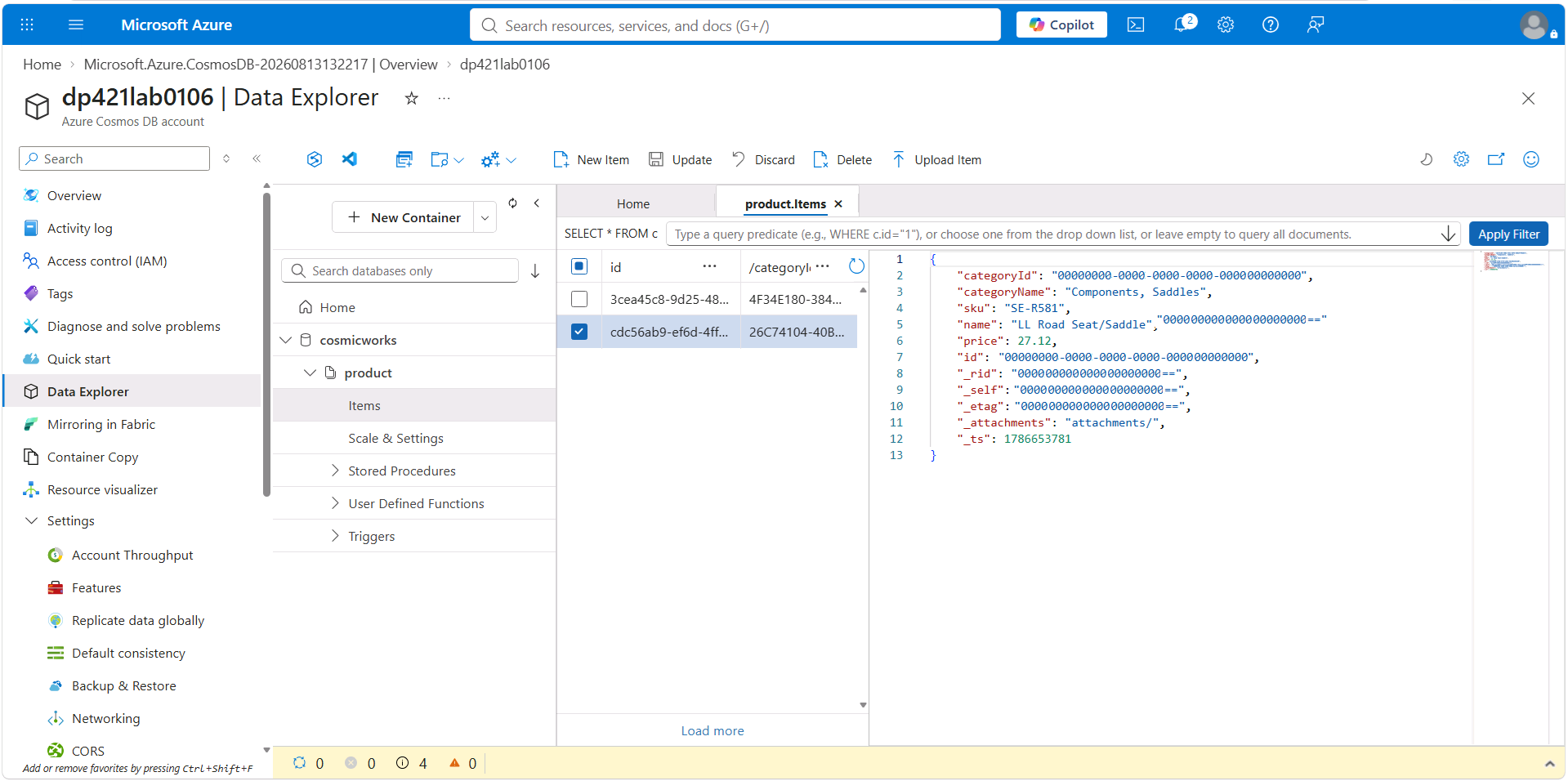
Data Explorer in the portal shows the hierarchy as a tree: expand a database to see containers, expand a container to see items, and select an item to view or edit JSON. It is ideal for early trials with no code. Production teams usually provision accounts, databases, and containers as infrastructure as code, while item writes and queries run from portal or SDK code.

Data Explorer showing database, container, items, and selected JSON

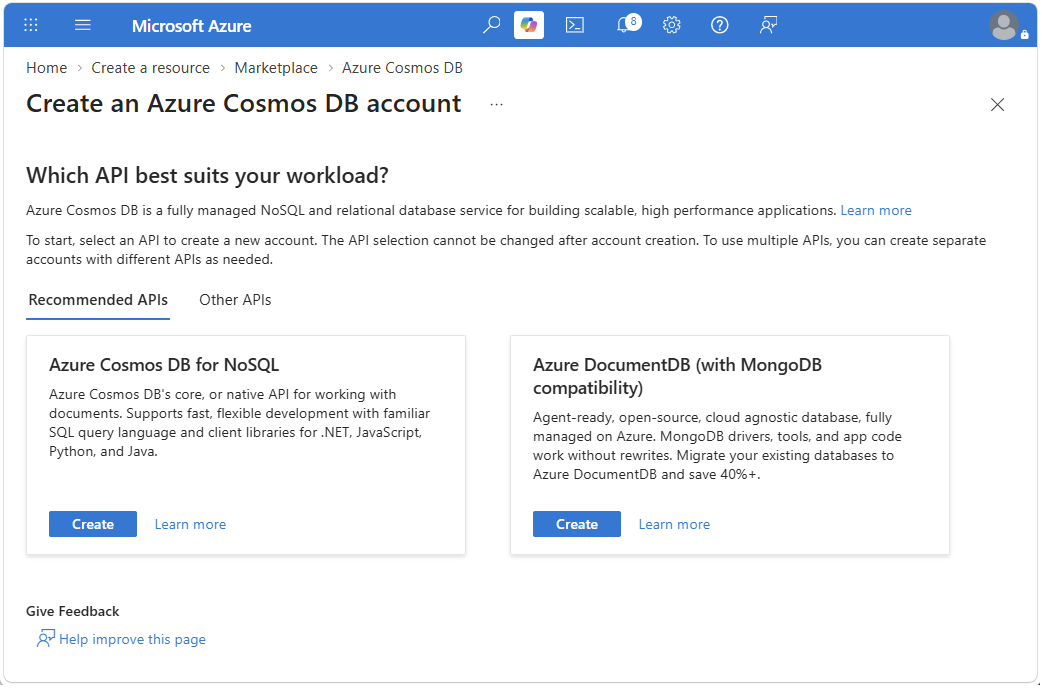
Account creation starts with the API choice, which is permanent, so select NoSQL for these workloads.

Portal list of Cosmos DB APIs during account creation

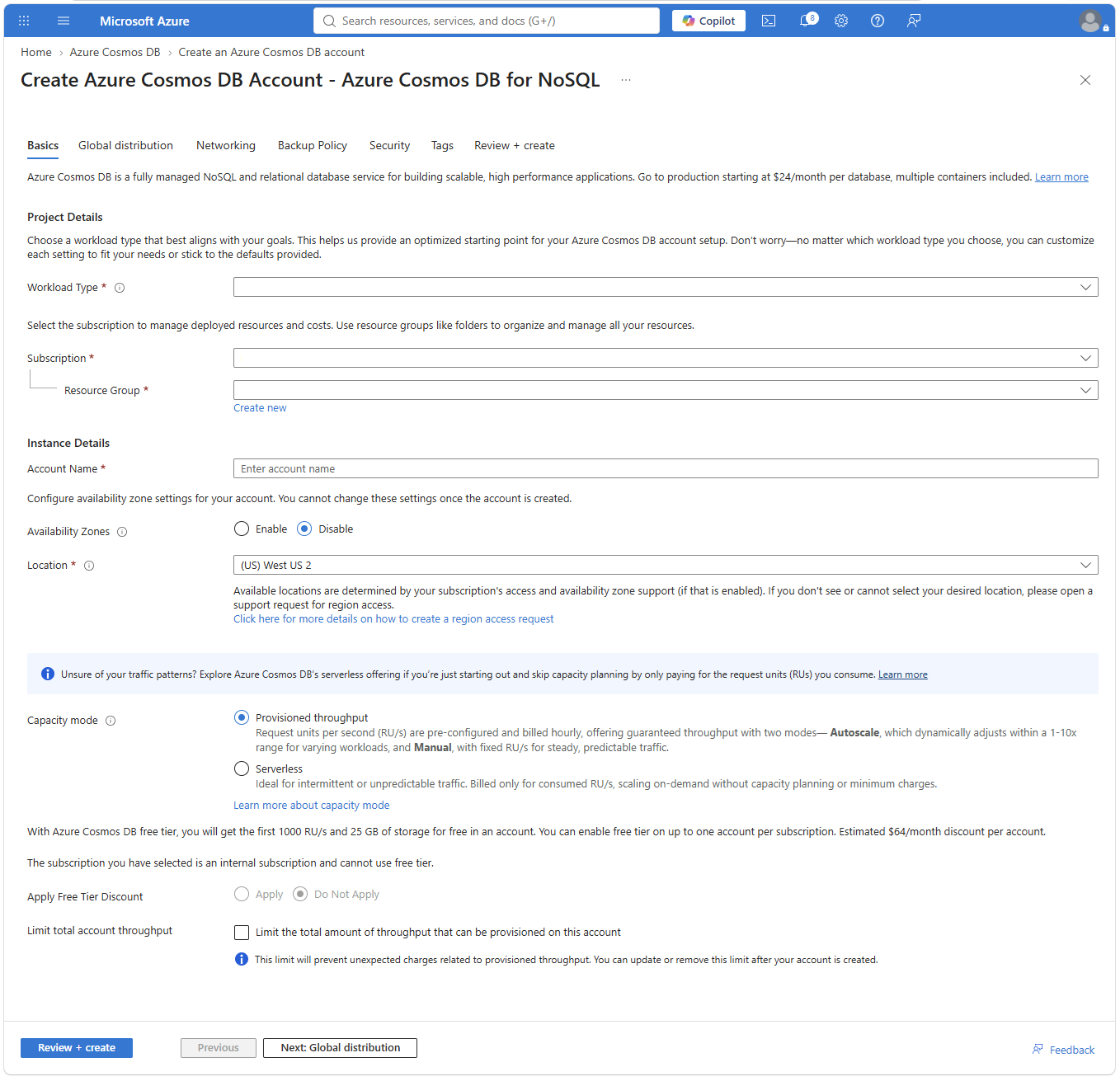
A wizard then asks for a globally unique account name, the home region, and a capacity mode of provisioned throughput or serverless. With provisioned mode, specific values including autoscale are set later on the database or container. Workload type and a free-tier discount are also available.

Account creation fields for name, location, and capacity mode

A database needs only a name unique in the account. A container needs its parent database, a name unique in that database, and a partition key path such as /categoryId that groups related items. The path cannot be edited in place; changing it means copying data to a new container, so a products-by-category grouping deserves care.

Items are added as JSON. If id is omitted, Data Explorer generates one through its client SDK; code should supply a string id unless the client creates it. Teams often reuse a known value like an order number so the item can later be point-read directly. The service adds _rid and _etag, indexes the document at once, and makes it queryable.

{

  "categoryId": "4F34E180-384D-42FC-AC10-FEC30227577F",

  "categoryName": "Components, Pedals",

  "sku": "PD-R563",

  "name": "ML Road Pedal",

  "price": 62.09

}

Reading means selecting an item to see full JSON or running the SQL-like language. One query returns all items in the chosen container, and a filtered form narrows to one category.

SELECT * FROM product p
SELECT * FROM product p WHERE p.categoryId = "4F34E180-384D-42FC-AC10-FEC30227577F"

The FROM target is not a relational table. A query always hits exactly one container selected in Data Explorer or opened in code and cannot span containers like a SQL join. The name there is only an alias inside the query, so product can match the container for clarity and p shortens references such as p.categoryId. Filters on the partition path stay in one logical partition and run more efficiently because every property is already indexed.

14. A product container was created with partition key path /categoryId but the team later needs /sku. What must happen to change the partition key?
  • The container is deleted automatically and throughput is refunded with no further action
  • The key path updates in place and existing items are rehashed with no downtime or copy
  • A new container with the new key path must be created and data copied into it
  • The database name must change and all SDKs must switch APIs
Show answer and explanation
  • A new container with the new key path must be created and data copied into it

The partition key path fixes how items group and scale, and it cannot be altered in place, so a new container and data copy are required.

15. The API selected when an Azure Cosmos DB account is created is fixed for the life of the account and cannot be changed later.
  • True
  • False
Show answer and explanation
  • True

The API is fixed for the life of the account, so NoSQL must be selected at creation for workloads built on this course.

16. A NoSQL query always runs against exactly one ____, and the name product in FROM product p is only an ____ for that container’s items inside the query.

Query scope

  • alias
  • container
  • database
  • index
  • region
Show answer
  • A NoSQL query always runs against exactly one container, and the name product in FROM product p is only an alias for that container’s items inside the query.
17. An online shop wants to fetch an order directly using its known order number instead of searching first. Which item property should hold that order number to allow a point read by ID and partition key?
Show answer and explanation
  • id

Supplying a known string id, such as an order number, enables a later point read by ID and partition key without querying first.

Extra questions

Designers ask for the ceiling that applies to each physical shard for throughput and to each logical shard for capacity.

18. The cap per physical partition is ____ RU/s and the cap per logical partition is ____ of storage.
  • 10 GB
  • 10,000
  • 20 GB
  • 400
  • 5,000
  • 50 GB
  • Unlimited
Show answer
  • The cap per physical partition is 10,000 RU/s and the cap per logical partition is 20 GB of storage.

In account1 you create a container partitioned on CompanyID with a composite unique key on UserName and EmailAddress, then plan to load the rows below.

CompanyIDUserNameEmailAddress
Company1user1user1@contoso.com
Company1user1USER1@contoso.com
Company1user2user2@outlook.com
Company2user1user1@litwareinc.com
Company2user2user2@outlook.com
19. How many unique-key conflicts will the load produce?
  • 0
  • 1
  • 2
  • 3
Show answer and explanation
  • 0

Uniqueness is enforced only inside each logical partition and comparisons are case sensitive. The two Company1 user1 rows differ in email case so they are distinct, and the Company2 row that duplicates a Company1 email sits in a different CompanyID partition, so no violation occurs.

A Contacts container uses automatic indexing, partition path /companyID, and a unique combination on /familyName plus /givenNames. Two records already exist.

companyIDfamilyNamegivenNamesemailAddress
1RogersTerry Johnterryj@contoso.com
1Rogersnullrogers@contoso.com

Three further records are candidates for insertion.

ItemcompanyIDfamilyNamegivenNamesemailAddress
11Rogersterry johnterryj@contoso.com
21Rogersnullrogers2@contoso.com
32RogersTerry Johnterryj@contoso.com
20. The first candidate record can be added.
  • True
  • False
Show answer and explanation
  • True

Uniqueness is checked per companyID and comparisons are case-sensitive, so lower-case terry john does not duplicate Terry John.

21. The second candidate record can be added.
  • True
  • False
Show answer and explanation
  • False

Null participates in the constraint. Company 1 already holds Rogers with null, so a second identical combination is rejected.

22. The third candidate record can be added.
  • True
  • False
Show answer and explanation
  • True

Checks apply only inside one logical partition. Company 2 is a different partition, so its identical name pair is allowed.

A new container will hold employee records for 5,000 small firms. Every firm has at most 25 staff and every staff item carries an emailAddress. The address must be distinct for staff who belong to the same firm.

23. Choose ____ as the partition key and ____ as the unique key so the rule is enforced.
  • companyId
  • companyId+emailAddress
  • emailAddress
  • employeeId
Show answer
  • Choose companyId as the partition key and emailAddress as the unique key so the rule is enforced.

That's the end of the free part

Up next: Request Units, Provisioned vs Serverless Throughput, Consistency Levels and TTL

23 more pages and 647 questions in the full study guide.

See what is in DP-420 Azure Cosmos DB Study Guide & Exam Questions
Page 1 of 24