Brixus
  1. Courses
  2. Certification Study Guides
  3. AI-901 Azure AI Fundamentals Study Guide & Exam Questions
  4. Read
AI-901 Azure AI Fundamentals Study Guide & Exam Questions
  • 1.Part 1: Responsible AI: Fairness, Safety, Privacy, Inclusiveness, Transparency and Accountability
  • 2.Part 2: Generative AI Models, Model Selection and Deployment Options
    • 1. How Generative AI Models Work: LLMs, Tokens, Embeddings and Transformers
    • 2. Choosing a Foundry Model: Model Catalog, Model Cards, Benchmarks and Model Router
    • 3. Model Deployment Options: Serverless API, Managed Compute, Deployment Types and Parameters
  • 3.Part 3: AI Workloads: Generative AI, Agents, Text, Speech, Vision and Information Extraction
  • 4.Part 4: Generative AI Apps and Agents in Microsoft Foundry
  • 5.Part 5: Text Analysis and Speech Solutions with Foundry Tools
  • 6.Part 6: Computer Vision and Image Generation in Microsoft Foundry
  • 7.Part 7: Information Extraction with Azure Content Understanding

Your progress is not saved. You are trying this lesson as a guest, so your answers and progress are not saved.

2.2 Choosing a Foundry Model: Model Catalog, Model Cards, Benchmarks and Model Router

Use the Microsoft Foundry model catalog to discover, evaluate, and deploy models for generative AI applications. Start by narrowing the catalog to models that meet your requirements, compare their benchmark results, and then test promising candidates on your own tasks and data.

Choose a catalog category

Catalog category

Who provides and supports the models?

When to consider it

Foundry Models sold by Azure

Azure hosts and operates these models under Microsoft Product Terms. They include all Azure OpenAI models and selected models from other providers. They are billed through your Azure subscription, covered by Azure service-level agreements (SLAs), and supported by Microsoft.

When deep Azure integration, Microsoft support, or enterprise SLAs are important.

Foundry Models from partners and community

External providers and contributors supply most models in the catalog. Providers typically validate their own models and handle support and maintenance; SLA and support arrangements vary. The provider determines whether a model is deployable through managed compute or serverless deployment.

When you need specialized capabilities or rapid access to new models. Examples include Anthropic’s Claude family and models from the Hugging Face hub.

  • Some models sold by Azure offer fungible provisioned throughput, letting you use quota and reservations flexibly across eligible models.

  • Claude supports text and image input, text output, multilingual capabilities, and vision. Microsoft provides a dedicated Microsoft Support resource for Anthropic models.

  • The Hugging Face hub includes models for real-time inference with managed compute. To work with models deployable on managed compute, use a hub-based project in the Foundry portal (classic). Hugging Face provides a community forum and support.

Warning

Microsoft’s internal Responsible AI review of models sold by Azure does not guarantee that potential risks are mitigated. For any model, review its documentation and evaluate it in the context of your application. You are responsible for lawful use, model selection, and appropriate safeguards, including use of Azure AI Content Safety to meet the Acceptable Use Policy and the Microsoft Enterprise AI Services Code of Conduct.

Models from providers other than Microsoft are Non-Microsoft Products as defined in the Microsoft Product Terms and are subject to the terms provided with the models.

A team is choosing between two Foundry catalog categories for an application that needs deep Azure integration and Microsoft-provided support.

1. A Foundry application requires deep Azure integration, Microsoft-provided support, and an Azure service-level agreement. Which catalog category should the team prioritize?
  • Foundry Models sold by Azure
  • Foundry Models from partners and community
Show answer and explanation
  • Foundry Models sold by Azure

Foundry Models sold by Azure are hosted and operated by Azure, covered by Azure service-level agreements, and supported by Microsoft.
2. Microsoft’s internal Responsible AI review of a model sold by Azure guarantees that the model’s potential risks are mitigated for the team’s application.
  • True
  • False
Show answer and explanation
  • False

The review does not guarantee mitigation. Teams should review the model documentation and run their own evaluations in the context of the application.

3. For a Foundry model from partners and community, the ____ selects whether the model is deployable through managed compute or a serverless deployment.
  • customer choosing the model
  • model provider
  • model router
Show answer
  • For a Foundry model from partners and community, the model provider selects whether the model is deployable through managed compute or a serverless deployment.

Find candidates and read their model cards

Use keyword search and catalog filters to narrow the list. Then open a model card to check whether a candidate meets your technical and licensing requirements. For select models, use View leaderboard and Compare models to access benchmark results, or open the model card’s Benchmarks tab.

Catalog filter

What it narrows by

Collections

Model provider collections

Region

Availability for deployment in specific Azure regions

Deployment options

Supported options: managed compute or Serverless API

Deployment SKU

Available deployment types for the Serverless API option

Lifecycle

Preview, Generally available, or Deprecated

Industry

Industry-specific datasets used to train models, such as health, retail, or manufacturing

Supported features

Model features such as reasoning and tool calling

Inference tasks

Task types such as chat completion, audio generation, or embeddings

Model card area

What to look for

Quick facts

Key information at a glance

Details tab

Description, version information, and supported data types

Deployments tab

Existing deployments for the model

Benchmarks tab

Performance benchmark metrics for select models

License tab

Legal information about model licensing

If a model is missing from the catalog, you can ask Microsoft to add it:

  1. Open the model catalog page in the Foundry portal.

  2. Use the search bar to search for a model that does not exist in the catalog, such as mymodel.

  3. Select Request a model and share details about the model you want.

4. While narrowing a Foundry model search, which catalog filter addresses each requirement?
  • Check where a model is available for deployment.
  • Find models that support tool calling.
  • Find models for audio generation.
  • Narrow the available deployment types for Serverless API.
  • Deployment SKU
  • Inference tasks
  • Region
  • Supported features
Show answer and explanation
  • Check where a model is available for deployment.: Region
  • Find models that support tool calling.: Supported features
  • Find models for audio generation.: Inference tasks
  • Narrow the available deployment types for Serverless API.: Deployment SKU

Region filters by deployment availability in specific Azure regions.

Supported features includes capabilities such as tool calling and reasoning.

Inference tasks filters by task type, such as audio generation.

Deployment SKU filters the deployment types available for Serverless API.

5. You have found a candidate in the Foundry model catalog. Which model card tab should you open to verify its supported data types and version information?
  • Benchmarks
  • Details
  • Deployments
  • License
Show answer and explanation
  • Details

The Details tab contains the model description, version information, and supported data types.

6. Put the steps for requesting a missing model in the Foundry portal in order.
  • Open the model catalog page.
  • Search for a model that does not exist in the catalog.
  • Select Request a model and share details.
Show answer
  1. Open the model catalog page.
  2. Search for a model that does not exist in the catalog.
  3. Select Request a model and share details.

Match model capabilities to the workload

Azure OpenAI in Microsoft Foundry offers models with different capabilities and price points. Availability varies by region and cloud.

Models

Description

GPT-6.2 series

gpt-6.2-astra, gpt-6.2-sol

GPT-6.1 series

gpt-6.1-sol, gpt-6.1-terra

GPT-6 series

gpt-6-astra, gpt-6-luna, gpt-6-sol

GPT-5.6 series

gpt-5.6-sol, gpt-5.6-terra, gpt-5.6-luna

GPT-chat-latest (preview)

gpt-chat-latest (preview)

GPT-5.5 series

gpt-5.5

GPT-5.4 series

gpt-5.4-mini, gpt-5.4-nano, gpt-5.4, gpt-5.4-pro

GPT-5.3 series

gpt-5.3-codex

GPT-5.2 series

gpt-5.2-codex, gpt-5.2

GPT-5.1 series

gpt-5.1, gpt-5.1-codex, gpt-5.1-codex-mini

GPT-5 series

gpt-5, gpt-5-mini, gpt-5-nano

gpt-oss

Open-weight reasoning models

computer-use-preview

An experimental model trained for use with the Responses API computer use tool.

GPT-4o, GPT-4o mini, and GPT-4 Turbo

Azure OpenAI models with multimodal versions that can accept both text and images as input.

Embeddings

Models that convert text to numerical vectors to facilitate text similarity.

Image generation

Models that generate original images from natural language.

Audio

Models for speech to text, translation, and text to speech. GPT-4o audio models support either low-latency speech-in, speech-out conversations or audio generation.

Context budget versus pricing categories

  • The context window is the total token budget for a request. Input, generated output, and reasoning tokens share it. Separate input and output limits are not additive allowances; more input leaves fewer tokens for generation.

  • Max Output Tokens is an upper limit, not a guaranteed output size. Setting max_output_tokens does not reserve tokens if the remaining context budget is smaller.

  • For Azure OpenAI models with short-context and long-context pricing categories, classification depends on the input tokens in the individual request. A model with a large window can receive a short-context request. Output tokens do not determine the category but remain subject to applicable pricing. Microsoft’s Azure OpenAI pricing reference gives model-specific thresholds and billing details.

7. For a model whose input, generated output, and reasoning tokens share one context window, setting `max_output_tokens` reserves that many output tokens even when the remaining context budget is smaller.
  • True
  • False
Show answer and explanation
  • False

The setting is a ceiling, not a reservation. The shared context budget can leave less room for generation than the configured limit.

8. A model has a large context window and uses Azure OpenAI short-context and long-context pricing categories. What determines the context pricing category for one request?
  • The model’s maximum context window
  • The number of generated output tokens
  • The number of input tokens in the request
  • The sum of input and generated output tokens
Show answer and explanation
  • The number of input tokens in the request

The category depends on input tokens in the individual request, not the total context window or the generated output.

Compare embedding and media models

Embedding models represent text as numerical vectors for similarity tasks. OpenAI reports that both third-generation models improve average multilingual retrieval on MIRACL while maintaining performance on English tasks on MTEB. For benchmark details, see MIRACL from Project MIRACL and the MTEB benchmark project.

Model ID

MIRACL average

MTEB average

text-embedding-ada-002

31.4

61.0

text-embedding-3-small

44.0

62.3

text-embedding-3-large

54.9

64.6

Model ID

Max request (tokens)

Output dimensions

Training data (up to)

text-embedding-ada-002 (version 2)

8,192

1,536

Sep 2021

text-embedding-ada-002 (version 1)

2,046

1,536

Sep 2021

text-embedding-3-large

8,192

3,072

Sep 2021

text-embedding-3-small

8,192

1,536

Sep 2021

  • Moving from text-embedding-ada-002 to text-embedding-3-large requires generating new embeddings; you cannot upgrade between embedding models.

  • Third-generation models support a dimensions parameter to reduce vector size. Larger embeddings typically require more compute, memory, and storage. In OpenAI’s MTEB testing, third-generation performance remained slightly better than text-embedding-ada-002 even below its 1,536 dimensions.

  • Use these models only with Embedding API requests. An input array can contain at most 2,048 items per call to the embedding endpoint.

Image generation models create images from text prompts. OpenAI’s Sora video generation model in Azure OpenAI was retired on November 2, 2026.

Model ID

Max request (characters)

gpt-image-1-mini

4,000

gpt-image-1.5

4,000

gpt-image-2

4,000

gpt-image-2.5-flare

4,000

gpt-image-2.5-sunburst

4,000

9. When moving a text similarity workload from `text-embedding-ada-002` to `text-embedding-3-large`, the existing embeddings can be upgraded in place instead of regenerated.
  • True
  • False
Show answer and explanation
  • False

Moving between these embedding models requires generating new embeddings.

10. A team uses a third-generation embedding model and wants smaller generated vectors. What can it adjust to control the vector size?
  • The `dimensions` parameter
  • The `max_output_tokens` parameter
Show answer and explanation
  • The `dimensions` parameter

The `dimensions` parameter lets third-generation embedding models generate smaller vectors, giving the team more control over cost and performance.

Interpret leaderboard results

Model leaderboards use industry-standard benchmarks to compare text language models, including large and small language models, and embedding models. For a promising candidate, open Detailed benchmarking results to deploy the model, try it in the playground, or evaluate it on your own data.

Comparison

How to use it

Language-model quality

A higher overall quality index indicates stronger performance across tasks. For a specialized workload such as coding or math, start with the relevant scenario leaderboard rather than relying only on the overall index.

Language-model safety

Read safety scores alongside quality, particularly for customer-facing applications. Lower Attack Success Rate indicates stronger robustness on the measured scenarios.

Language-model performance

Compare latency and throughput. A high-quality model with high latency might not be suitable for real-time use.

Language-model cost

Adjust expectations for workload estimates based on your actual input-to-output token ratio; the estimated cost metric assumes a three-to-one ratio. The separate execution-cost benchmark measures actual cost on the quality datasets.

Embedding-model quality

Compare performance on embedding-based tasks such as search and retrieval.

Tip

Leaderboards provide standardized comparisons using public datasets. Use them to shortlist candidates, then evaluate on your own data and use case before choosing.

Quality: know what the index aggregates

Index

Description

Quality index

Averages applicable accuracy scores (exact_match, pass@1, arena_hard) across benchmark datasets. It ranges from zero to one; higher is better.

Dataset name

Category

bigbench_hard (downsampled to 1,000 examples)

Reasoning

chembench

Chemistry

frontierscience

Scientific reasoning

gpqa

QA

mbppplus

Coding

mmlu_pro (downsampled to 1,000 examples)

General knowledge

musr

Reasoning

tau2_telecom

Agentic and tool call selection

Metric

Description

Accuracy

Dataset-level accuracy averages the metric across examples. The exact_match metric scores an exact text match as one and other responses as zero. HumanEval and MBPP use pass@1, the proportion of generated solutions that pass the code task’s unit tests. Model-level accuracy averages the model’s dataset-level accuracies. Scores range from zero to one; higher is better.

Safety: read the direction of each metric

Dataset name

Leaderboard scenario

Metric

Interpretation

HarmBench (standard)

Standard harmful behaviors

Attack Success Rate

Lower means stronger robustness against attempts to elicit standard harmful content.

HarmBench (contextual)

Contextually harmful behaviors

Attack Success Rate

Lower means stronger robustness against attempts to elicit contextually harmful content.

HarmBench (copyright violations)

Copyright violations

Attack Success Rate

Lower means stronger robustness against copyright violations.

WMDP

Knowledge in sensitive domains

Accuracy

Higher means greater knowledge in sensitive domains, which is worse from a safety standpoint.

Toxigen

Toxic content detection

F1 Score

Higher means better detection performance.

  • HarmBench uses direct prompts and evaluators to compute Attack Success Rate (ASR), without attack strategies. Foundry Guardrails are turned off for this evaluation and for Toxigen’s evaluation of toxic content detection.

  • Weapons of Mass Destruction Proxy (WMDP) averages accuracy across cybersecurity, biosecurity, and chemical security. The default Foundry Guardrails are on, but they do not target those domains.

  • No single benchmark represents safety across all scenarios. Saturation, misalignment between the benchmark design and the risk, and incomplete documentation can lead to overestimates or underestimates of real-world safety performance.

11. A team is shortlisting Foundry language models for a coding workload. Why start with the coding scenario leaderboard rather than relying only on the overall quality index?
  • It focuses on performance for the workload’s task rather than averaging across multiple capabilities.
  • It makes evaluation on the team’s own data unnecessary.
  • It ranks models only by latency instead of task quality.
Show answer and explanation
  • It focuses on performance for the workload’s task rather than averaging across multiple capabilities.

The scenario leaderboard focuses on coding, while the overall quality index combines results across multiple capabilities.

12. How should you interpret these changes in Foundry safety leaderboard scores?
  • Lower HarmBench Attack Success Rate
  • Higher Toxigen F1 Score
  • Higher Weapons of Mass Destruction Proxy accuracy
  • Better toxic content detection
  • Greater sensitive-domain knowledge, worse from a safety standpoint
  • Stronger robustness in the harmful-behavior scenario
Show answer and explanation
  • Lower HarmBench Attack Success Rate: Stronger robustness in the harmful-behavior scenario
  • Higher Toxigen F1 Score: Better toxic content detection
  • Higher Weapons of Mass Destruction Proxy accuracy: Greater sensitive-domain knowledge, worse from a safety standpoint

Lower Attack Success Rate indicates greater robustness on the evaluated HarmBench scenario.

Higher F1 indicates better toxic content detection on Toxigen.

Higher accuracy indicates more sensitive-domain knowledge, not better safety.

13. A low HarmBench Attack Success Rate is sufficient to establish that a model is safe across all real-world scenarios.
  • True
  • False
Show answer and explanation
  • False

A low rate is favorable on the measured scenarios, but no single benchmark captures safety across all scenarios.

Performance and cost: check what was measured

Foundry aggregates language-model performance trials over two weeks. These are the default benchmark conditions unless otherwise noted; they are not universal deployment defaults.

Parameter

Value

Applicability

Region

East US/East US2

Serverless API deployments and Azure OpenAI

Tokens per minute (TPM) rate limit

30k TPM for non-reasoning models (180 RPM based on Azure OpenAI); 100k TPM for reasoning models. Not applicable for serverless API deployments.

Azure OpenAI users can select rate limit ranges by deployment type. This setting is abstracted for serverless API deployments.

Number of requests

Two requests per hourly trial; 24 trials per day.

Serverless API deployments and Azure OpenAI

Number of trials/runs

14 days at 24 trials per day; 336 runs.

Serverless API deployments and Azure OpenAI

Prompt/context length

Moderate length.

Serverless API deployments and Azure OpenAI

Tokens processed (moderate)

80:20 input-to-output ratio: 800 input tokens to 200 output tokens.

Serverless API deployments and Azure OpenAI

Concurrent requests

One; requests sent sequentially.

Serverless API deployments and Azure OpenAI

Data

Synthetic prompts prepared from static text.

Serverless API deployments and Azure OpenAI

Deployment type

Serverless API.

Azure OpenAI only

Streaming

True.

Serverless API deployments and Azure OpenAI. For managed compute or endpoints without streaming support, TTFT is represented by latency P50.

SKU

Standard_NC24ads_A100_v4 (24 cores, 220 GB RAM, 64 GB storage).

Managed Compute only, to estimate cost and performance metrics.

Metric

What it measures

Latency mean

Average time in seconds to process a request, computed across requests over two weeks.

Latency P50

Median latency; 50% of requests complete within this time.

Latency P90

90th percentile latency; 90% of requests complete within this time.

Latency P95

95th percentile latency; 95% of requests complete within this time.

Latency P99

99th percentile latency; 99% of requests complete within this time.

Throughput GTPS

Generated tokens per second: output tokens generated per second from when the request is sent.

Throughput TTPS

Total tokens per second: input and generated output tokens processed per second. For nonstreaming models, TTFT represents latency P50.

Latency TTFT

Time to first token: time until the first response token is returned when streaming is enabled.

Time between tokens

Time between received tokens.

For a sense of typical responsiveness, look at time to first token (TTFT) and generated tokens per second (GTPS) together. They distinguish how long the user waits for the response to start from how quickly output is generated.

The cost benchmark reports actual execution cost in USD per run across standard quality datasets. Lower values indicate lower cost on that suite, not necessarily on your workload. The measured cost reflects:

  • Actual input, reasoning, and output tokens consumed.

  • Model-specific reasoning effort used for the evaluation, typically high or xhigh.

  • Dataset characteristics and complexity that affect token usage and runtime.

14. Which Foundry performance metric answers each question about a streaming language model?
  • How long does it take before the first response token arrives?
  • How many output tokens are generated per second?
  • How many input and output tokens are processed per second in total?
  • Generated tokens per second (GTPS)
  • Time to first token (TTFT)
  • Total tokens per second (TTPS)
Show answer and explanation
  • How long does it take before the first response token arrives?: Time to first token (TTFT)
  • How many output tokens are generated per second?: Generated tokens per second (GTPS)
  • How many input and output tokens are processed per second in total?: Total tokens per second (TTPS)

With streaming enabled, TTFT measures the wait for the first token.

GTPS counts generated output, not input.

TTPS includes both input and generated output.

15. Foundry’s execution-cost benchmark for language models calculates the cost of running the quality datasets using a fixed input-to-output token ratio instead of the tokens actually consumed.
  • True
  • False
Show answer and explanation
  • False

The execution-cost benchmark uses actual input, reasoning, and output token consumption. A fixed ratio is used for the separate estimated cost metric.

Use model router for per-prompt selection

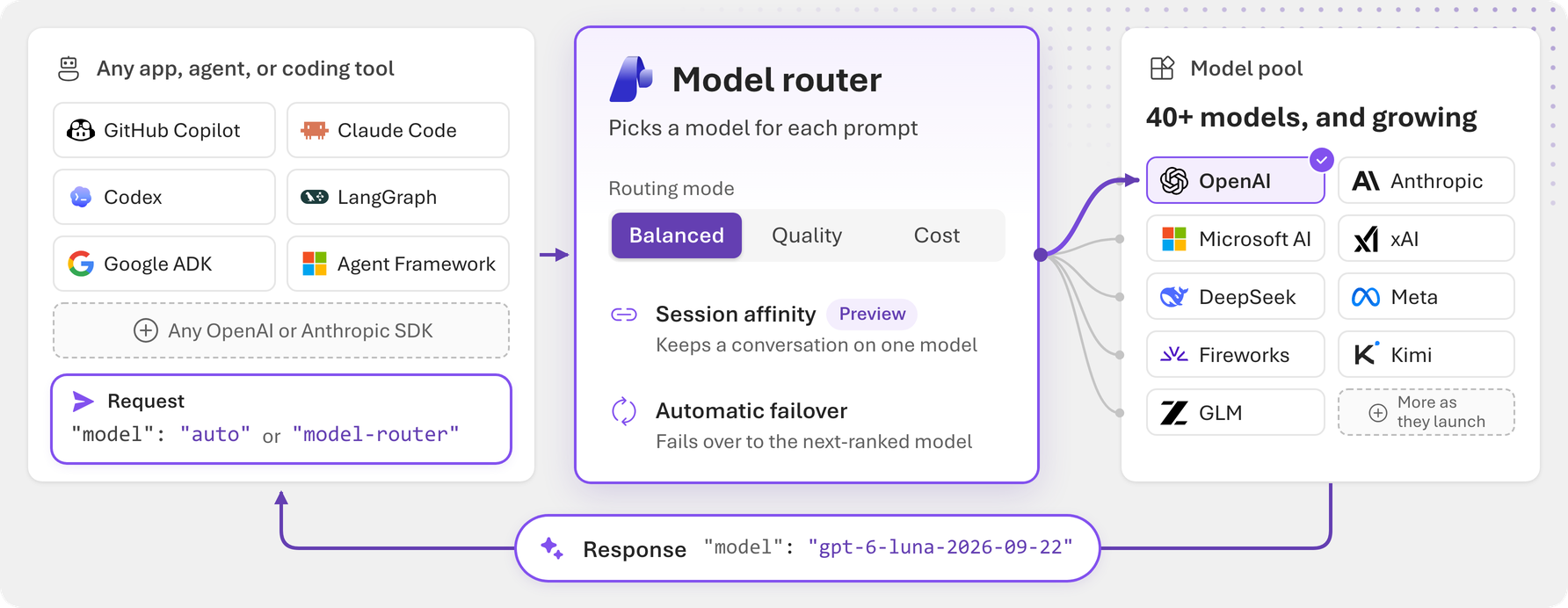
Model router is a Microsoft-trained routing model. An app, agent, or coding tool calls one model name, and the router judges each request and selects a model using the configured routing mode. Simple requests can go to small, fast models, while requests that need deep reasoning or complex tool use go to frontier models. The response’s model field identifies the model that answered.

An app, agent, or coding tool calls Auto or a model router deployment; the router selects a model and the response identifies it.
  • Balanced is the default mode. It picks the most cost-effective model within a small quality range of the best model for each prompt. Choose Quality or Cost to shift that trade-off.

  • Use the Responses API, Chat Completions API, or Messages API (preview). With Auto (preview), set model to auto on a Foundry resource or project endpoint; no deployment is required.

  • If the selected model returns a retryable error, model router automatically fails over to the next-best model. With session affinity (preview), a long chat or agent loop can stay on the same model when prompt-cache hits help lower cost and latency.

  • With capacity reuse (preview), model router serves the selected model from your deployments in the same Foundry resource first: provisioned throughput for OpenAI models, then pay-as-you-go. Router-managed capacity serves the rest.

  • Manage one model name, one rate limit, and one content filter. Use the deployment’s Monitor tab to compare costs with single-model baselines.

Warning

Before moving production traffic, compare model router with your current model on your own prompts for quality, cost, and latency. Preview features have no service-level agreement and Microsoft does not recommend them for production workloads. See Microsoft’s Supplemental Terms of Use for Microsoft Azure Previews.

An agent sends both quick classification requests and complex planning requests through one Foundry model router deployment.

16. An agent sends quick classification and complex planning prompts to Foundry model router in Balanced mode. How does the router decide which model to use?
  • It picks the most cost-effective model within a small quality range of the best model for each prompt.
  • It always picks the same model for every prompt sent to the endpoint.
  • It always picks the lowest-cost model regardless of quality.
Show answer and explanation
  • It picks the most cost-effective model within a small quality range of the best model for each prompt.

Balanced mode evaluates each prompt and picks the most cost-effective model within a small quality range of the best model for that prompt.

17. If the model selected by Foundry model router returns a retryable error, the agent must configure failover before the router can try the next-best model.
  • True
  • False
Show answer and explanation
  • False

Model router automatically fails over to the next-best model on a retryable error, with nothing to configure.

18. Which response field should an agent inspect to identify the model that answered a request routed by Foundry model router?
Show answer and explanation
  • model

The response’s `model` field names the model that answered.

Extra questions

19. Foundry evaluators remove the need to set token caps.
  • True
  • False
Show answer and explanation
  • False

Caps such as the maximum reply length and the deployment tokens-per-minute allowance are call and deployment settings. Evaluators grade replies after they are produced and do not govern how many tokens may be used.

20. Foundry evaluators are able to judge how good and how safe a generative model's answers are.
  • True
  • False
Show answer and explanation
  • True

Foundry supplies ready-made graders for broad quality such as coherence and fluency, for retrieval-grounded quality such as groundedness and relevance, for risk and safety such as hate and unfairness, violence and protected material, and for agent conduct such as tool-call correctness and task completion.

21. Foundry evaluators will by themselves retrain a live generative model once they notice defects.
  • True
  • False
Show answer and explanation
  • False

Graders only measure and report. Responding to the scores by revising prompts, grounding material or model selection, or by fine-tuning, is a separate action you perform.

How Generative AI Models Work: LLMs, Tokens, Embeddings and TransformersPage 4 of 24Model Deployment Options: Serverless API, Managed Compute, Deployment Types and Parameters