Brixus
  1. Courses
  2. Certification Study Guides
  3. AI-901 Azure AI Fundamentals Study Guide & Exam Questions
  4. Read
AI-901 Azure AI Fundamentals Study Guide & Exam Questions
  • 1.Part 1: Responsible AI: Fairness, Safety, Privacy, Inclusiveness, Transparency and Accountability
  • 2.Part 2: Generative AI Models, Model Selection and Deployment Options
    • 1. How Generative AI Models Work: LLMs, Tokens, Embeddings and Transformers
    • 2. Choosing a Foundry Model: Model Catalog, Model Cards, Benchmarks and Model Router
    • 3. Model Deployment Options: Serverless API, Managed Compute, Deployment Types and Parameters
  • 3.Part 3: AI Workloads: Generative AI, Agents, Text, Speech, Vision and Information Extraction
  • 4.Part 4: Generative AI Apps and Agents in Microsoft Foundry
  • 5.Part 5: Text Analysis and Speech Solutions with Foundry Tools
  • 6.Part 6: Computer Vision and Image Generation in Microsoft Foundry
  • 7.Part 7: Information Extraction with Azure Content Understanding

Your progress is not saved. You are trying this lesson as a guest, so your answers and progress are not saved.

2.3 Model Deployment Options: Serverless API, Managed Compute, Deployment Types and Parameters

Microsoft Foundry Models is a hub for discovering and deploying models for generative AI applications. A deployment makes a model available for inference requests. Foundry shows the deployment options appropriate to the model you select.

Tip

With instant access (preview), you can call a supported model by name from a Foundry project and run inference without creating a deployment. Instant access and deployments can coexist in the same project, so you can start experimenting and deploy later.

Choose a deployment option

  • Serverless API is the preferred option whenever available and supports the widest range of capabilities and deployment types. Azure OpenAI models and select partner and community models, including Anthropic models, use this path.

  • Managed compute runs open-source, partner, industry, and custom models on dedicated GPU capacity. Examples from the Hugging Face Collection include Qwen and NVIDIA Nemotron models.

  • Foundry Local on Azure Local (preview) runs eligible models on connected Azure Local infrastructure, using Azure Arc-enabled Kubernetes clusters that you own and operate.

The decision tree starts by asking whether you need a deployment. If not, it points to instant access. If you do, the next decision is the model type. Eligible Foundry Local models can run on Azure Local (preview). For Foundry Models, the tree shows a Serverless API path whose deployment types launch globally first and reach a single region last. For open-source or custom models, it shows a managed compute path with managed GPUs or dedicated accelerators. In practice, use the options Foundry makes available for the specific model.

Diagram: Choose how to run a model, Need a deployment?, Instant access (preview): no deployment, Model type, Serverless API (preferred), Global (first), Data Zone, Single region (last), Managed compute: Foundry-managed GPUs, Dedicated accelerators, Foundry Local on Azure Local (preview), Customer-owned Azure Arc-enabled clusters

Capability

Serverless API

Managed compute

Foundry Local on Azure Local

Which models can be deployed?

All Foundry Models, including Foundry Models sold by Azure and select Models from partners and community

Open-source and partner models from the model catalog, NVIDIA NIM, and industry models

Eligible models from the Foundry Local collection

Where models run

Microsoft-hosted endpoints

Microsoft-managed GPU capacity

Your connected Azure Local clusters

Infrastructure owner

Microsoft

Microsoft

You (customer-owned)

Deployment resource

Foundry resource

Foundry project

Foundry project

Requires AI Hub

No

No

No

Requires a connected environment

Yes

Yes

Yes (connected Azure Local)

Data processing options

Regional, data zone, global

Global, Data Zone (US/EU)

Your Azure Local environment

Private networking

Yes

Yes

Determined by your Azure Local environment

Content filtering

Built-in and customizable

Not available

Guardrails setting available at deployment

Keyless authentication

Yes (Microsoft Entra ID and key-based)

Yes (Microsoft Entra ID and key-based)

See Azure Local documentation

Billing

Token usage or provisioned throughput units

Hourly per accelerator SKU

Azure Local and related Azure infrastructure charges apply; see Azure Local pricing

  • With an Azure OpenAI resource, the model catalog shows only Azure OpenAI models for deployment. Use a Foundry resource for access to the full set of Foundry Models.

  • With managed compute, Foundry chooses the GPUs per instance based on the model and workload, provisions the accelerators, and patches the serving runtime. You use the same Foundry project endpoint and authentication as other deployment types.

  • Managed compute quota is granted per accelerator SKU per region. Existing Azure VM quota cannot be used for managed compute. Managed compute is currently available for global deployment.

Explore the current selection of open-source and partner models in the model catalog from Microsoft Foundry.

1. In Microsoft Foundry, match each model-hosting arrangement to the deployment option that provides it.
  • Run an eligible model on a connected Azure Arc-enabled Kubernetes cluster your organization owns and operates.
  • Host a custom-weight model on dedicated GPUs while Foundry chooses the GPUs and patches the serving runtime.
  • Deploy an Azure OpenAI model on a Microsoft-hosted endpoint with built-in, customizable content filtering.
  • Foundry Local on Azure Local (preview)
  • Managed compute
  • Serverless API
Show answer and explanation
  • Run an eligible model on a connected Azure Arc-enabled Kubernetes cluster your organization owns and operates.: Foundry Local on Azure Local (preview)
  • Host a custom-weight model on dedicated GPUs while Foundry chooses the GPUs and patches the serving runtime.: Managed compute
  • Deploy an Azure OpenAI model on a Microsoft-hosted endpoint with built-in, customizable content filtering.: Serverless API

Foundry Local on Azure Local runs eligible models on customer-owned clusters.

Managed compute provides dedicated GPU capacity and a Microsoft-managed runtime.

Serverless API supports Azure OpenAI model deployments and built-in, customizable content filtering.
2. A team deploying a model with managed compute can use its existing Azure VM quota for the dedicated accelerators.
  • True
  • False
Show answer and explanation
  • False

Managed compute quota is separate from Azure VM quota and is granted per accelerator SKU per region.

Choose a Serverless API deployment type

A deployment type, or deployment SKU, determines where inference data is processed, how you pay, and performance characteristics such as latency variance and throughput limits. These types apply to Serverless API, not managed compute. Not all models support all types.

Deployment type

SKU code

Data processing

Billing

Best for

Global Standard

GlobalStandard

Any Azure region

Pay-per-token

General workloads, highest quota

Global Provisioned

GlobalProvisionedManaged

Any Azure region

Reserved PTU

Predictable high-throughput

Global Batch

GlobalBatch

Any Azure region

50% discount, 24-hr

Large async jobs

Data Zone Standard

DataZoneStandard

Within data zone

Pay-per-token

EU/US/APAC data zone compliance

Data Zone Provisioned

DataZoneProvisionedManaged

Within data zone

Reserved PTU

Data zone + predictable throughput

Data Zone Batch

DataZoneBatch

Within data zone

50% discount

Large async jobs with data zone

Standard

Standard

Within Azure geography

Pay-per-token

Geography compliance, low volume

Regional Provisioned

ProvisionedManaged

Within Azure geography

Reserved PTU

Geography compliance + throughput

Developer

DeveloperTier

Any Azure region

Pay-per-token

Fine-tuned model evaluation only (24-hour lifetime, no SLA or data-residency guarantee)

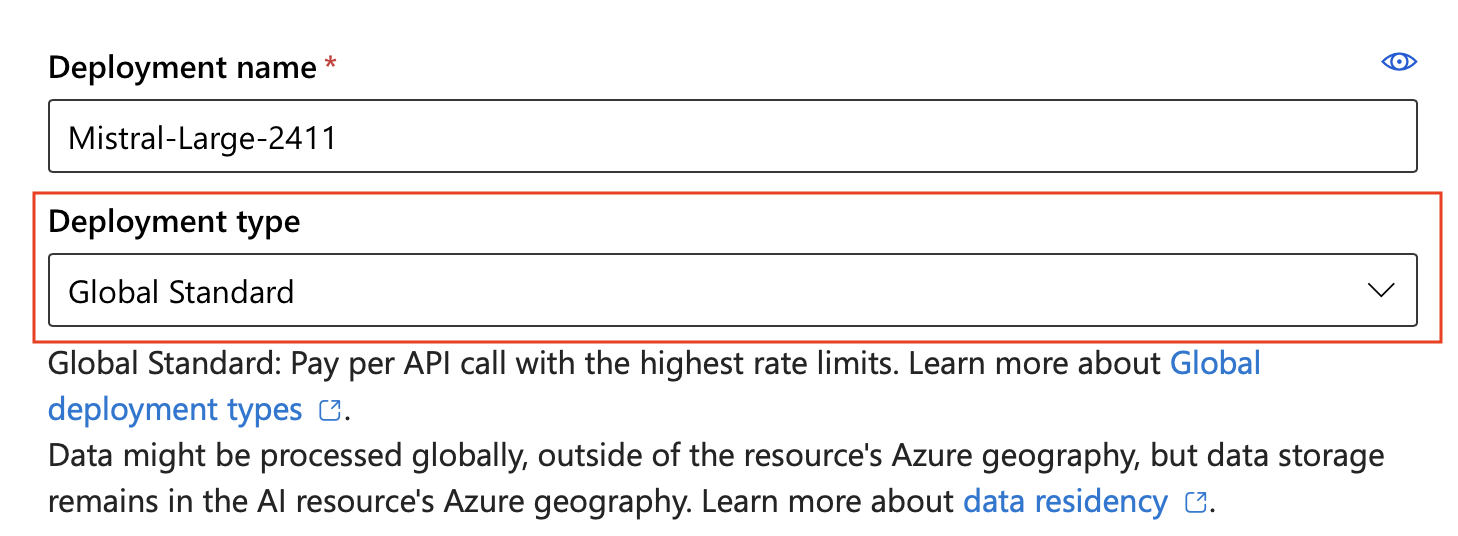
The Foundry portal deployment dialog with Global Standard selected.

For most workloads, start with Global Standard: it launches first for new models, has the lowest price, and offers the broadest region coverage. Deployment types become available in order: Global, then Data Zone, then geography-based. Geography-based types have no guaranteed availability date and depend on capacity freed as older models retire.

Requirement

Recommended tier

Default: newest models, lowest price, broadest regions

Global Standard

Reserved, predictable throughput

Global Provisioned

Keep processing within a data zone

Data Zone Standard or Data Zone Provisioned

Data residency plus reserved throughput

Data Zone Provisioned

Keep processing within an Azure geography

Standard or Regional Provisioned (where supported)

Large asynchronous jobs at lower cost

Global Batch or Data Zone Batch (where supported)

Evaluate a fine-tuned model (temporary, no SLA)

Developer

  • Standard types suit variable, bursty traffic when latency variance is acceptable. They use pay-per-token billing and offer best-effort service.

  • Provisioned types suit consistent high volume or workloads that need lower latency variance. They reserve capacity in provisioned throughput units (PTUs) and provide guaranteed throughput.

  • Batch types offer discounted asynchronous processing for large jobs that are not time-sensitive.

  • Developer supports temporary evaluation of fine-tuned models without a service-level agreement (SLA). It is not intended for latency-sensitive workloads.

Warning

Distinguish data at rest from inference processing. Stored data stays in the designated Azure geography for all deployment types. The deployment type determines where prompts and responses are processed.

  • Global: Inference data may be processed in any Azure region.

  • Data Zone: Inference data is processed only within the Microsoft-specified US, EU, or Asia Pacific (APAC) data zone. The EU Data Zone follows the Azure EU Data Boundary, which can include countries such as Norway and Switzerland.

  • Standard and Regional Provisioned: Prompts and responses are processed within the customer-specified Azure geography and may move between regions within it for operational purposes.

Microsoft Azure provides a reference on data residency for more detail.

3. In what order do Global, Data Zone, and geography-based deployment types become available for a new model in Microsoft Foundry? Start with the earliest.
  • Data Zone
  • Geography-based
  • Global
Show answer
  1. Global
  2. Data Zone
  3. Geography-based
4. A team deploying through Serverless API needs predictable reserved throughput and must keep inference processing within a specified data zone. Which type meets both requirements?
  • Global Provisioned
  • Data Zone Standard
  • Data Zone Batch
  • Data Zone Provisioned
Show answer and explanation
  • Data Zone Provisioned

Data Zone Provisioned combines reserved throughput with inference processing restricted to the specified data zone.

5. With Global Standard, storing data at rest in a designated Azure geography also guarantees that inference processing stays within that geography.
  • True
  • False
Show answer and explanation
  • False

Data at rest stays in the designated Azure geography, but Global Standard can process inference data in any Azure region.

6. A team has a large inference job that can run asynchronously and must keep processing within a specified data zone. Which Serverless API type is designed to offer discounted batch processing within that zone?
  • Global Batch
  • Data Zone Provisioned
  • Data Zone Batch
  • Data Zone Standard
Show answer and explanation
  • Data Zone Batch

Data Zone Batch offers discounted asynchronous processing within the specified data zone.

Decide when instant access is enough

Scenario

Recommended approach

Getting started, prototyping, or experimentation

Instant access

Using the latest model immediately after release

Instant access

Need reserved capacity or predictable throughput

Deployment

Require provisioned throughput (PTU)

Deployment

Need data residency in a specific region

Deployment

Custom content filtering policies per model

Deployment

Custom guardrails per model

Deployment

Endpoint-specific configuration (for example, version locks per endpoint)

Deployment

Fine-grained quota partitioning across teams

Deployment

Fine-tuned models

Deployment

7. A team is prototyping with a supported Foundry model and later needs to lock the model version for a specific endpoint. Which approach lets the team start without a deployment and add endpoint-specific configuration later?
  • Start with instant access and create a deployment when the endpoint needs a version lock.
  • Use instant access at both stages, because instant access supports endpoint-specific configuration.
  • Create a deployment before making any prototype inference requests.
Show answer and explanation
  • Start with instant access and create a deployment when the endpoint needs a version lock.

Instant access lets the team call a supported model by name without deploying it. It can pin a version by adding a date suffix to the model name, but endpoint-specific configuration, such as a version lock per endpoint, requires a deployment, which the team can create later in the same project.

Allocate Azure OpenAI quota

Azure OpenAI quota is assigned to a subscription per region, model, and deployment type in tokens per minute (TPM). Assigning TPM to a deployment sets its inference TPM rate limit and reduces the remaining quota for that allocation. At the quota limit, free capacity by reducing TPM assigned to other deployments of the same model or obtain approval for a quota increase in the desired region.

A requests per minute (RPM) limit is also enforced. The RPM-to-TPM ratio can vary by model: each capacity unit provides a linked pair of limits, not independently adjustable TPM and RPM values. Check this relationship when deploying programmatically to avoid allocating the wrong capacity. These ratios come from the quota documentation, and most models in the table are no longer available: o1-preview retired in July 2025, and o1, o3, o3-mini, o3-pro and o4-mini reached their retirement date on November 19, 2026. The lesson still applies: check the RPM-to-TPM ratio of the model you deploy.

Model

Capacity

Requests Per Minute (RPM)

Tokens Per Minute (TPM)

Older chat models

1 Unit

6 RPM

1,000 TPM

o1 & o1-preview

1 Unit

1 RPM

6,000 TPM

o3

1 Unit

1 RPM

1,000 TPM

o4-mini

1 Unit

1 RPM

1,000 TPM

o3-mini

1 Unit

1 RPM

10,000 TPM

o1-mini

1 Unit

1 RPM

10,000 TPM

o3-pro

1 Unit

1 RPM

10,000 TPM

8. A team has exhausted its Azure OpenAI TPM quota for a model and deployment type in a region. How can it make room for another deployment within that same quota without a quota increase?
  • Reduce the TPM assigned to an existing deployment that draws from the same quota.
  • Increase the TPM assigned to an existing deployment drawing from the same quota.
  • Allocate RPM to the new deployment independently of TPM.
Show answer and explanation
  • Reduce the TPM assigned to an existing deployment that draws from the same quota.

Reducing assigned TPM on an existing deployment that draws from the same quota frees TPM for another deployment.

9. An Azure OpenAI deployment script can assume that the same TPM assignment always implies the same RPM limit across different models.
  • True
  • False
Show answer and explanation
  • False

RPM and TPM are linked by capacity units, but the ratio can vary by model.

Manage model versions

Azure OpenAI supports automatic model updates only for Standard deployment types, and only for select model deployments. Where supported, the model version upgrade policy controls how a deployment moves to a new version.

  • Auto-update to default: The deployment updates within two weeks of a change in the default version. For a preview version, automatic updates can start two weeks after the new preview version is released. Use this policy during early inference testing when available.

  • Specific model version: Keep the selected version while you test and validate application behavior before a manual update. If the selected version reaches retirement first, the deployment automatically upgrades to the default version at that time.

10. A team wants to validate application behavior before adopting a new Azure OpenAI model version. Which choice gives the team manual control over the upgrade until the selected version retires?
  • Select a specific model version.
  • Set the upgrade policy to Auto-update to default.
  • Select a specific model version and assume it will remain in use after retirement.
Show answer and explanation
  • Select a specific model version.

Selecting a specific model version keeps it in use until a manual update or retirement. At retirement, the deployment automatically upgrades to the then-current default.

Tune response randomness

Temperature controls response randomness and can range from 0 to 2. A higher value, such as 0.7, gives more varied responses and can suit fictional writing. A lower value, such as 0.2, gives more focused, concrete responses and is recommended for drafting a legal document.

Top_p (Top_probability) also controls response randomness, but in a different way. The general recommendation is to change one of these parameters at a time, not both.

Max output tokens caps the length of a response: max_tokens or max_completion_tokens in the Chat Completions API, and max_output_tokens in the Responses API. Stop sequences (stop, up to four) end the response as soon as the model produces one of them, and the stop sequence itself isn't returned. A frequency penalty makes a token less likely the more often it has already appeared, which reduces repetition; a presence penalty makes any token that has appeared at all less likely, which nudges the model toward new topics. Most reasoning models, including the o-series and GPT-5 reasoning models, don't support temperature, top_p, the two penalties or max_tokens (they use max_completion_tokens or max_output_tokens), and some don't support stop sequences either. Some GPT-6 models do accept temperature and top_p, so check the parameters your model supports.

11. When adjusting temperature, use a ____ value for more varied fictional responses and a ____ value for more focused legal drafting.

Compare drafting goals.

  • fixed
  • higher
  • lower
Show answer
  • When adjusting temperature, use a higher value for more varied fictional responses and a lower value for more focused legal drafting.
12. When tuning response randomness, the general recommendation is to change temperature and Top_p together rather than changing one at a time.
  • True
  • False
Show answer and explanation
  • False

Both parameters affect response randomness in different ways. The general recommendation is to change only one at a time.

That's the end of the free part

Up next: Common AI Workloads: Generative AI, Agents, Text, Speech, Vision and Information Extraction

19 more pages and 407 questions in the full study guide.

See what is in AI-901 Azure AI Fundamentals Study Guide & Exam Questions
Choosing a Foundry Model: Model Catalog, Model Cards, Benchmarks and Model RouterPage 5 of 24